
Content management
CMS is a system where the site’s content is run by a content manager, not a developer. It owns page structure, media files, multiple languages, publishing queues and access rights. A good CMS is measured simply: can a new employee add a page without a ten-step manual and without any risk of breaking the layout?
What it is
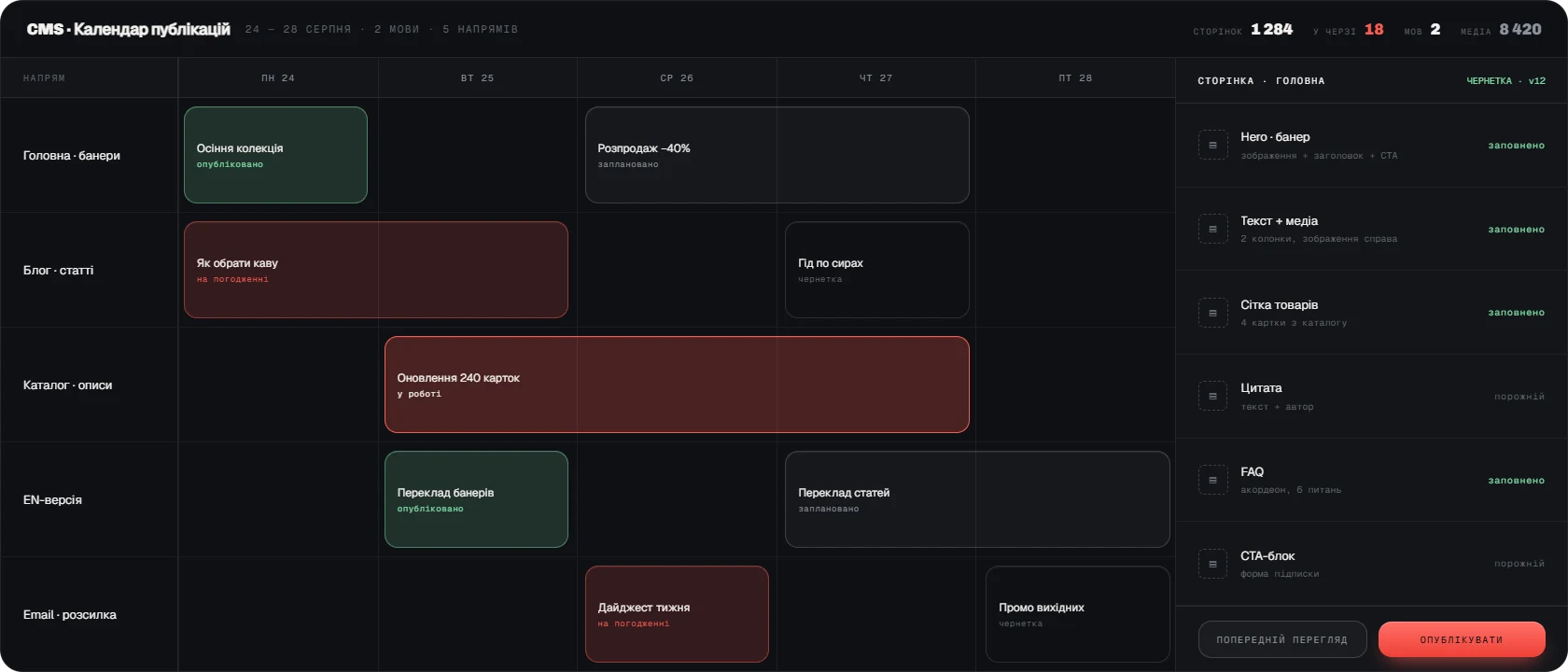
A Content Management System separates content from presentation. A page is assembled from ready-made blocks, each block has a limited set of fields, so the content cannot fall apart because of a long heading or an image of the wrong size. The media library keeps every file in one place and generates the sizes it needs, and multilingual support works at the level of individual fields — a translation can be done gradually without duplicating the page.
For a network of sites or several publications a CMS solves one more problem: a shared editorial team with separated rights. The author writes, the editor approves, publication happens on schedule. The system keeps versions, so any change can be compared and rolled back. SEO fields, redirects and the sitemap are built into the system itself rather than bolted on with plugins after launch.

Why you need it
A CMS is needed when every change on the site requires going to a developer.
- A developer updates the content
Fixing a single paragraph takes a day and costs money, so the site slowly goes stale.
- The layout breaks
Filling pages by hand leads to blocks sliding out of place and different spacing on identical pages.
- No control over publishing
Material goes out chaotically, with no approval and no schedule.
- Languages are handled by copying
Language versions drift apart because only one of them ever gets updated.
What the system owns
A CMS owns the whole life cycle of content: creation, approval, publication and archive.
- Page and block structure
A builder with fixed blocks that cannot be broken by whatever is typed into them.
- Media library
One store for images and files, automatic sizes, alt texts.
- Multiple languages
Translation at field level, control over how complete a translation is, language URLs.
- Publishing queue
Release schedule, drafts, editorial approval, versions and rollback.
- Access rights
Author, editor and administrator roles with different capabilities.
- SEO foundation
Meta tags, canonical URLs, redirects, sitemap, structured data.
What implementation delivers
A CMS hands control of the site back to marketing: content is updated on the day the decision is made, not in the next development sprint. The layout stays intact, language versions do not drift, and the SEO structure needs no retrofitting. We build a CMS around your specific editorial model — from a single site to a network of publications with a shared newsroom.