Own product of XPro

XFitness ERP

An ERP for fitness clubs, gyms and sports sections — the whole business under control in one solution. It automates every core process, from member records to finance and stock. It comes with a client mobile app, a staff workspace app and an app for trainers.

4

applications in one system

7

modules in the main program

8

modules in the Work zone app

1380 ₴

plans from, per 30 days

Part 01 · Client app

XFitness client app

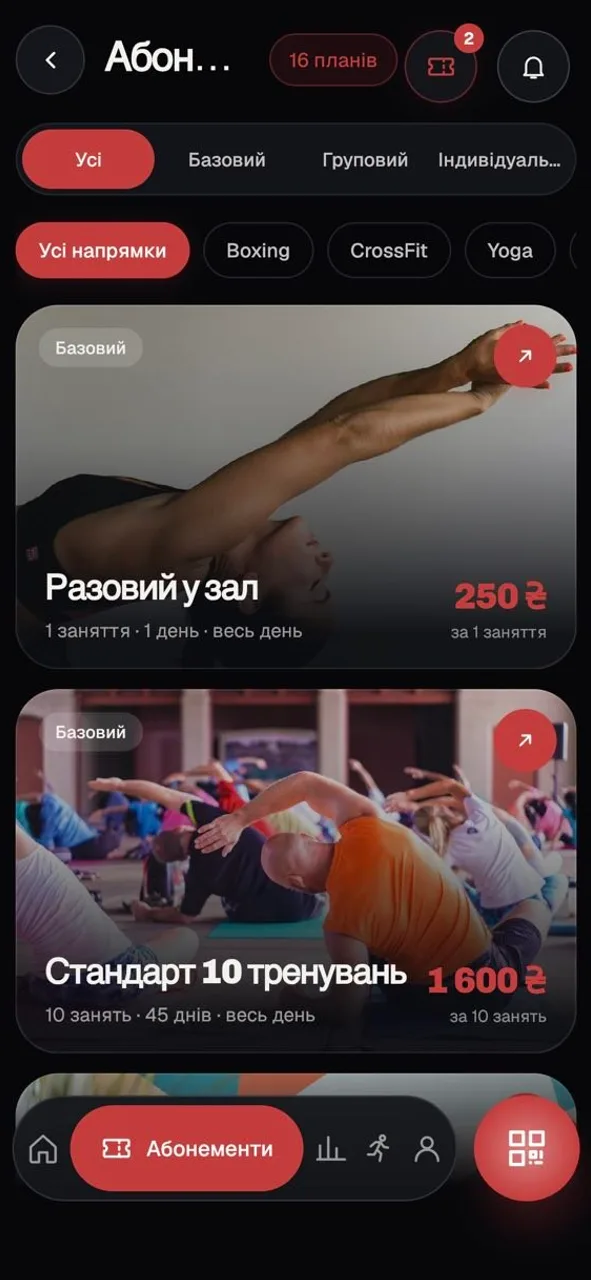
The five screens a member opens most often: sign-in, the membership catalogue, gym entry, attendance analytics and trainers.

The XFitness client app is a mobile app for your gym’s members on iOS and Android. Members buy and renew memberships themselves, see the sessions left and the expiry date, enter the gym with a QR code and follow their own training. The front desk is freed from the routine questions of “how many sessions do I have left” and “until when is my membership valid”.

Everything a member does in the app shows up instantly in the main program and at the front desk: the membership they bought, the gym entry, the deposit top-up. The app is branded for your club — logo, colours, photos of the gym — and published on the App Store and Google Play under your own name.

01 / 05

Sign-in

The member signs in to the club’s mobile app with a phone number: enters the number, receives an SMS code and is in. No passwords, e-mail or separate registration — the front desk does not explain “how to create an account”, and the member does not forget a password before training.

The phone number is the same one stored in the main program’s member base, so the app immediately shows purchased memberships, visit history and the deposit. A new member who is not in the base yet is created automatically and appears in the administrator’s Clients module.
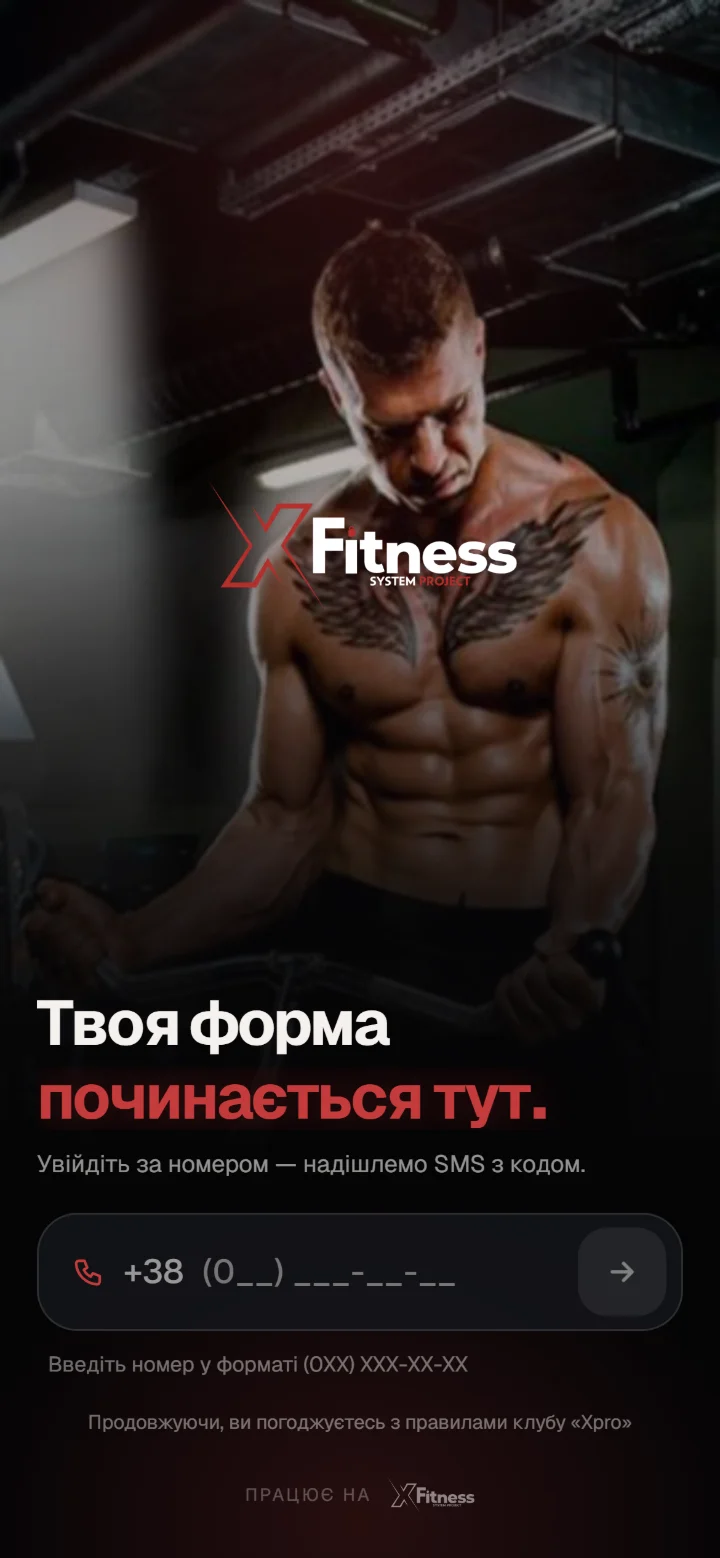
Screen: Sign-in — XFitness client app
02 / 05

Membership catalogue

The club’s membership catalogue right on the phone: single visits, session packs, unlimited plans, group and personal training. Filters by type and discipline — boxing, CrossFit, yoga, gym — show only what suits the member, and the card displays the price, number of sessions, validity and visiting hours.

The member picks and buys a membership on their own, with no queue at the front desk and no calls to the administrator. The purchase shows up in the main program and in the club’s finance instantly, and the membership becomes active in the app — ready for the gym. For the owner this means sales 24/7, including nights and weekends when the front desk is closed.

Screen: Membership catalogue — XFitness client app
03 / 05

Gym entry

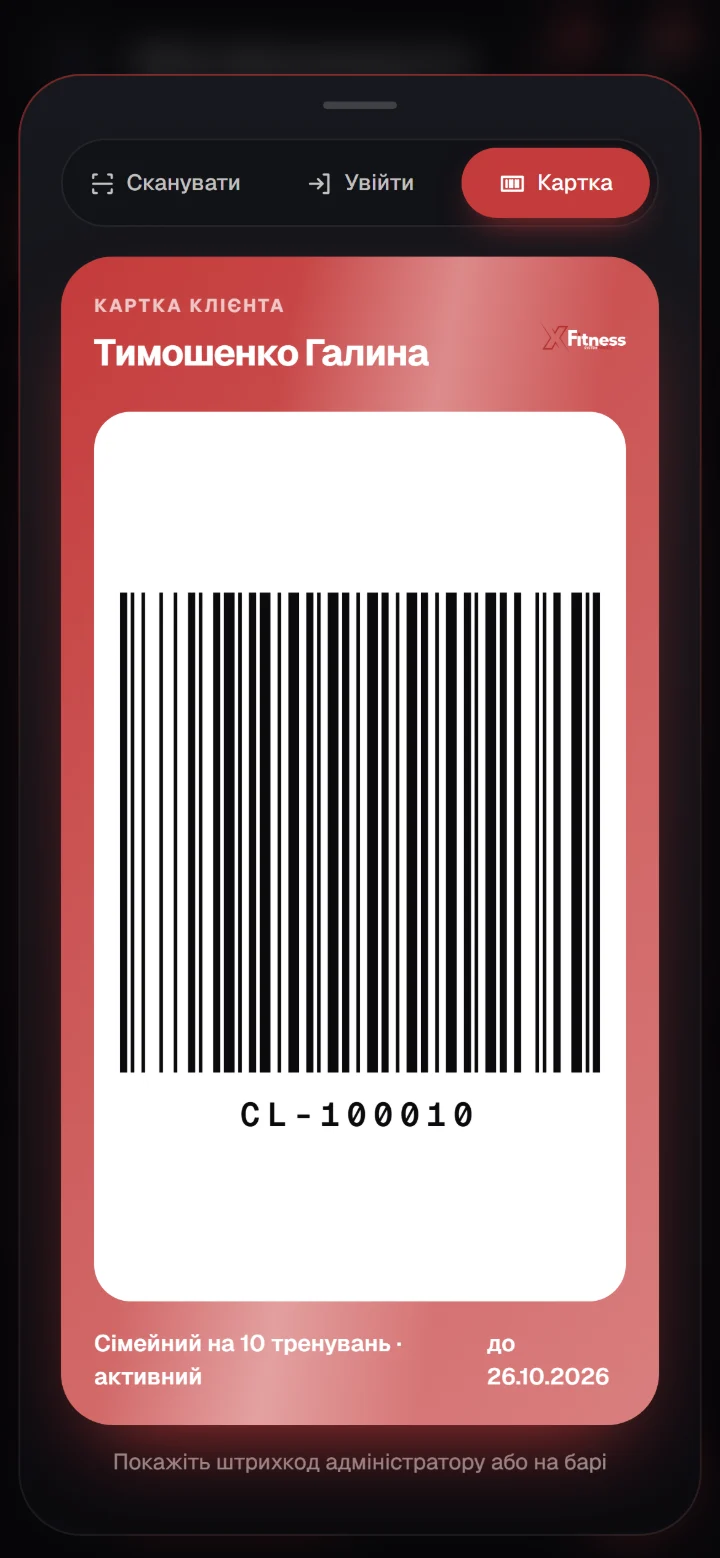
Gym entry with a QR code from the app: the member shows the code to the front-desk scanner or simply walks up to the door with a Bluetooth unit — and the entrance opens. No plastic cards that get lost, and no administrator who has to check everyone in by hand.

Every entry is recorded in the system: a visit is deducted from the membership, the member’s statistics are updated, and the administrator in the Work zone sees who is in the gym right now. If the membership has expired or no sessions are left, the app says so before the door and offers to renew.

Screen: Gym entry — XFitness client app
04 / 05

Attendance analytics

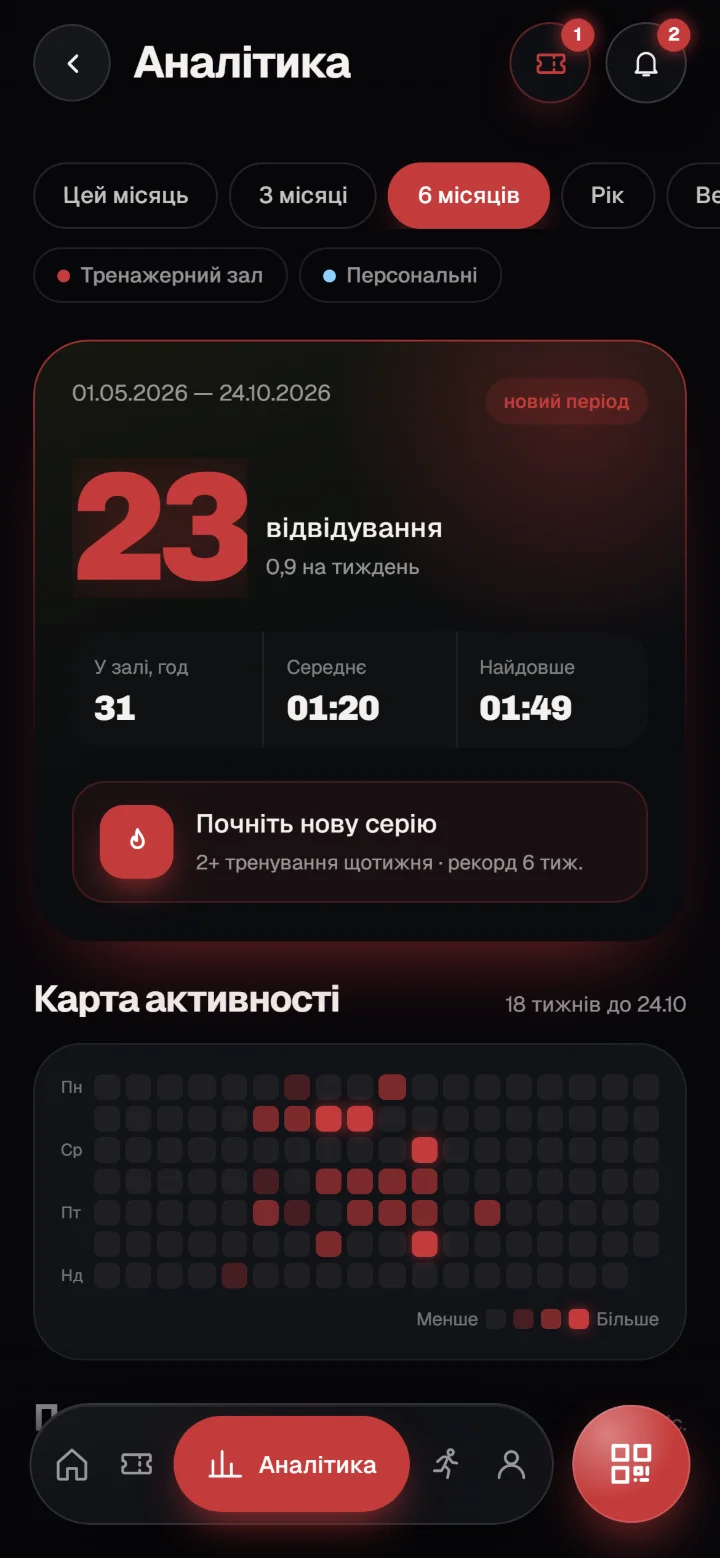
Attendance analytics is built on real QR-scan entries, not on self-reporting: how many times the member was in the gym this week and this month, which days and hours they train most often, and how the rhythm holds up compared with last month.

The member sees their progress in numbers — and that is what keeps them from skipping sessions. For the club it is a tool too: the same data shows in the Marketing module who has started coming less often and risks not renewing, so the administrator reaches out before the member disappears.

Screen: Attendance analytics — XFitness client app
05 / 05

Trainers

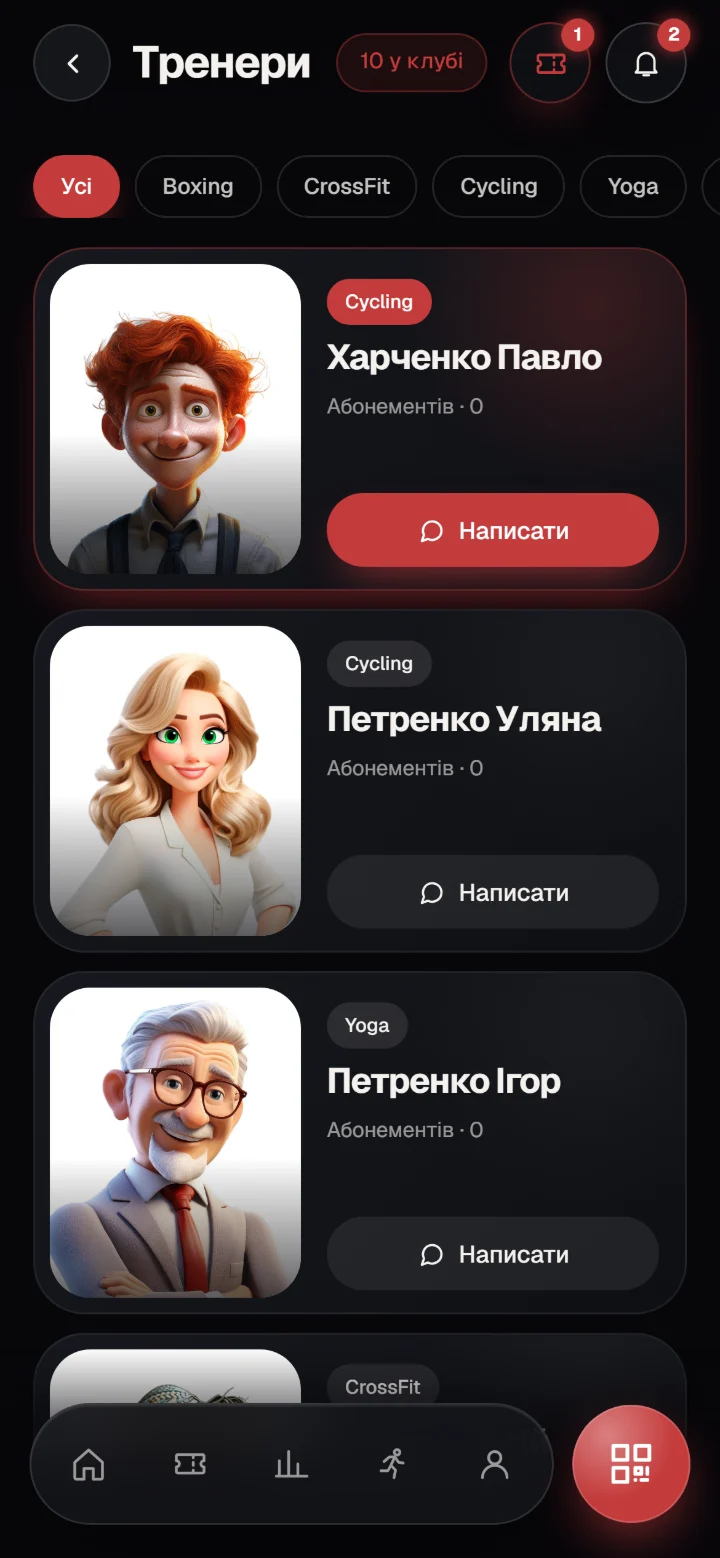
The Trainers section lists every trainer of the club with a photo, disciplines, experience and schedule. A filter by discipline shows who runs boxing, CrossFit or personal training, and the “Message” button opens a chat with the trainer right in the app.

The member books a session with a specific trainer and buys a personal-training membership without leaving the app. The trainer sees the booking in their own app and the club sees it in the main program’s schedule: nothing gets lost in messengers or notebooks at the front desk.

Screen: Trainers — XFitness client app
Part 02 · Main program

Main program

The core of the system for the owner and management: members, memberships, finance and staff in one window, with live analytics and a full audit log.

The main program is an ERP and CRM for a fitness club in one browser window: a member base with purchase and visit history, a membership catalogue, a training schedule, a bar with stock, staff with payroll and finance with a log of every transaction. The owner sees the club in numbers in real time — from the office, from home or from a phone.

The system suits gyms, fitness studios, martial arts sections, dance schools and club chains. Every action is tied to an employee, so it is always clear who sold a membership, who took a payment and who changed a price.

01 / 07

Clients module

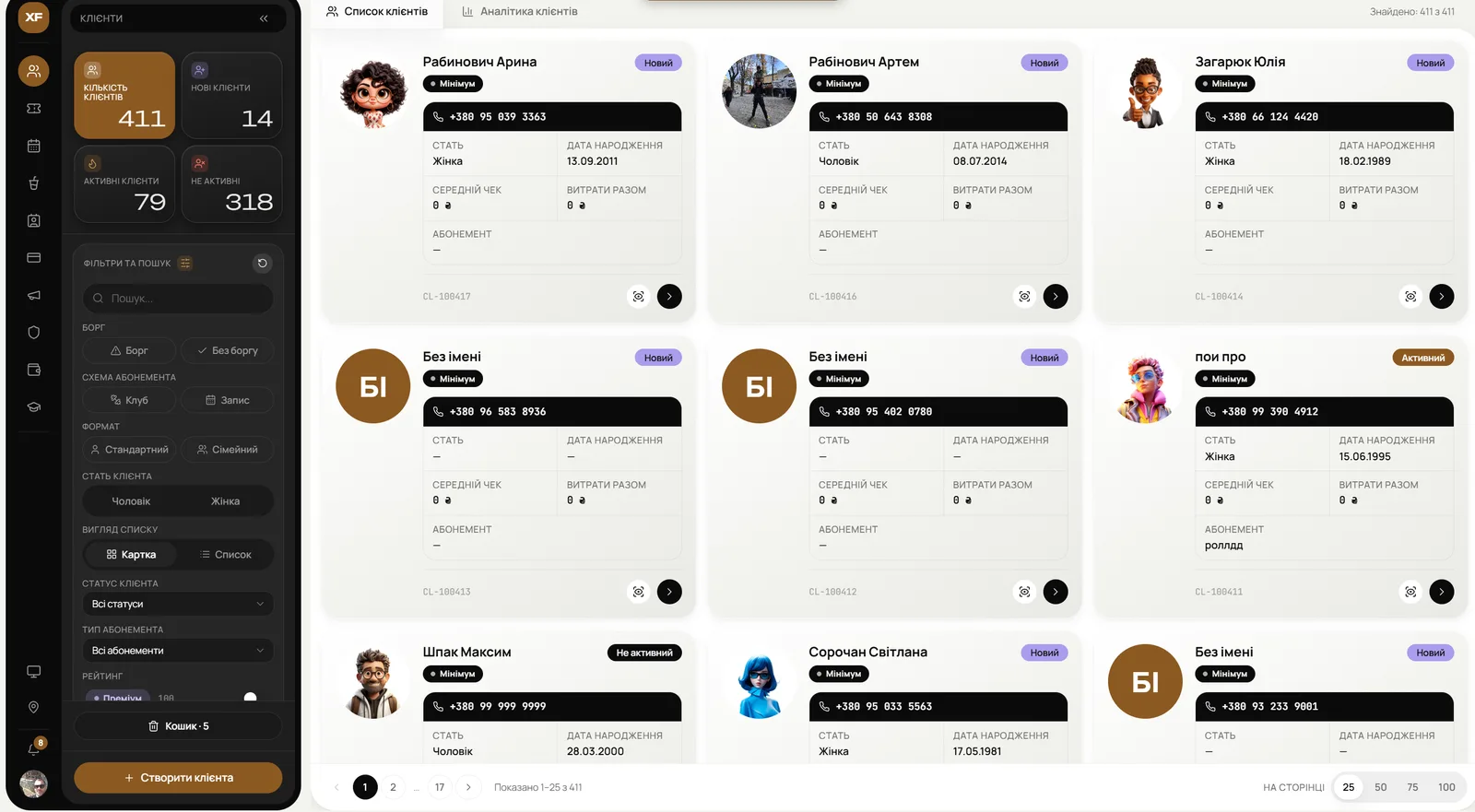
The Clients module is the fitness club’s CRM: a digital card for every member with phone, date of birth, status, rating, average receipt, lifetime spending and current membership. The list works as cards or as a table, and search finds a member by name, phone or code.

Filters by gender, status, membership scheme, format, debt and rating let you pull up, say, every member without an active membership or with a debt in a second. Counters at the top show the base in numbers: total members, new ones this month, active and inactive. Any selection exports to CSV.

xfitness.erp / clients
Screen: Clients module — Main program
02 / 07

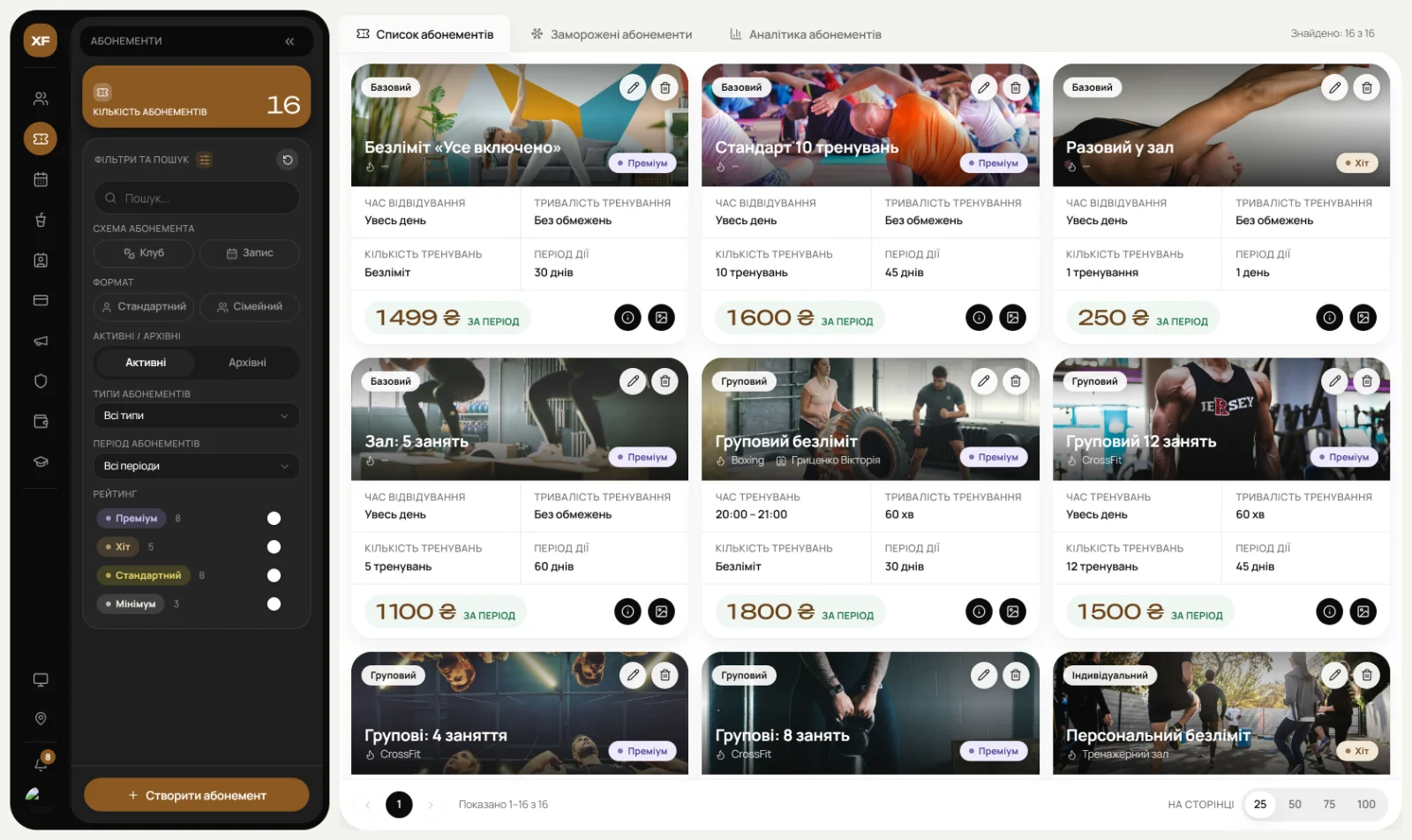
Memberships module

The club’s membership catalogue in one place: type (basic, group, personal, split), discipline, number of sessions, validity period, visiting hours and session length. This is where new memberships are created, prices and terms changed, old ones frozen and archived.

Every change is instantly visible in the client app and in the Work zone — the front desk can never sell a membership at an outdated price. The Membership analytics tab shows what sells best, how much each item brought in and which memberships expire in the coming days.

xfitness.erp / memberships
Screen: Memberships module — Main program
03 / 07

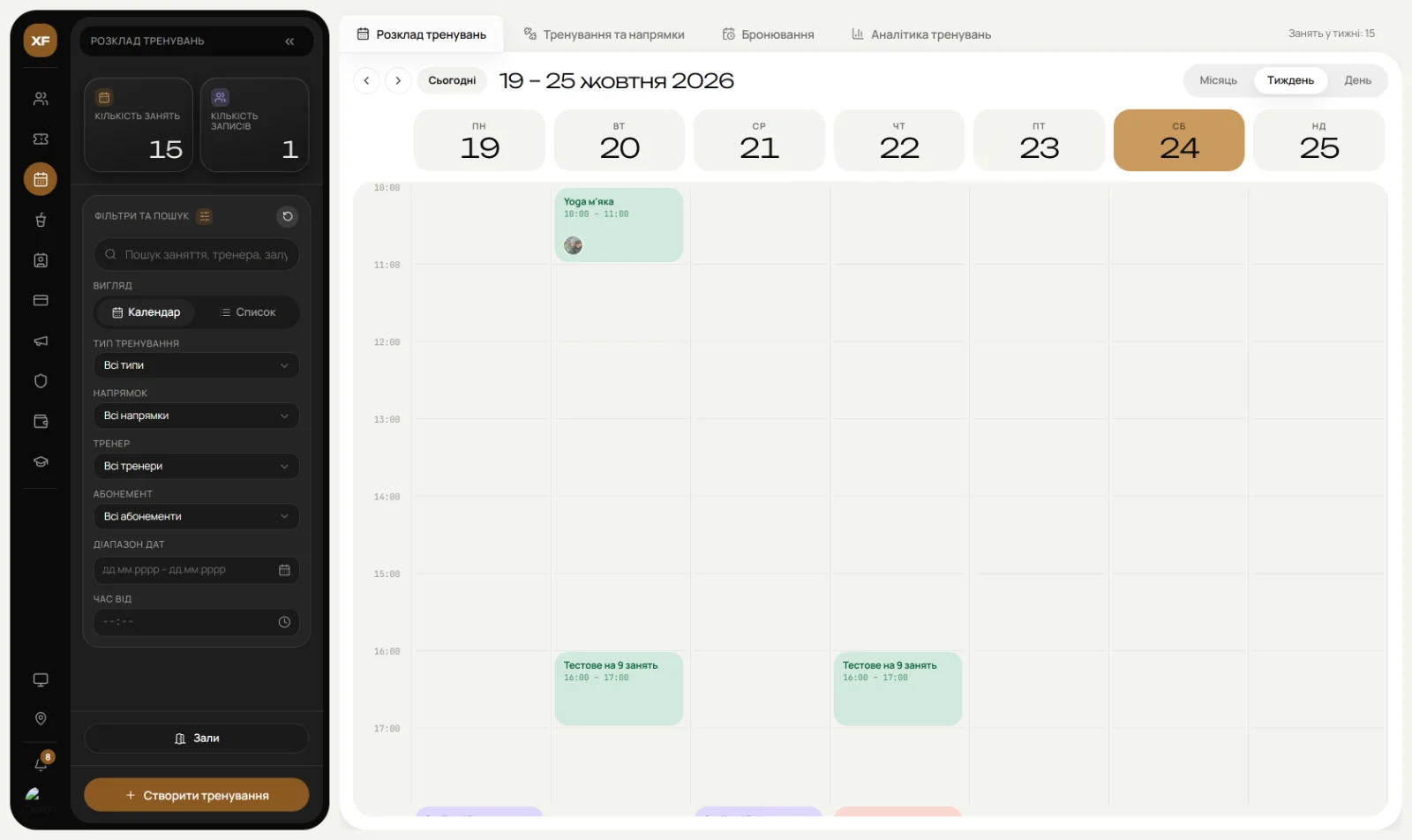
Training schedule module

The training schedule by month, week or day: group classes, personal sessions and splits across rooms and trainers. Filters by trainer, discipline and membership show only what you need, and colours mark the session type and status.

Sessions are created here and appear instantly in the client app for booking and in the trainer app. The system watches the number of spots, does not let a member book without a matching membership and keeps training analytics: group fill rates, room load, popular hours.

xfitness.erp / training schedule
Screen: Training schedule module — Main program
04 / 07

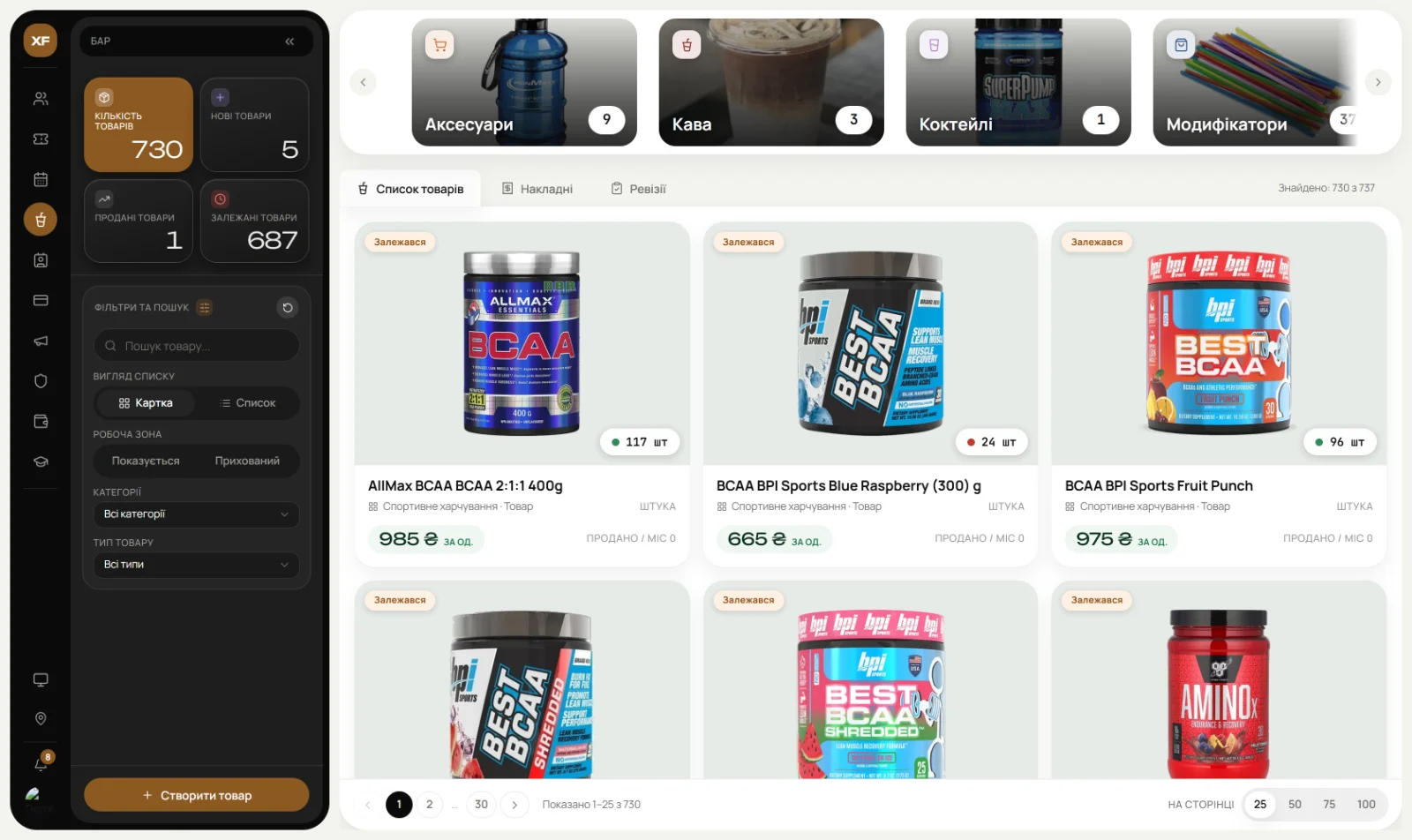
Bar module

The Bar module is the fitness club’s stock and products: sports nutrition, drinks, bars, coffee, accessories. Products are grouped by category with stock levels, cost and selling price; slow-moving and running-out items are shown separately.

Goods receipts are recorded with invoices, write-offs with stocktakes, and cocktails get recipes: a sale writes off the ingredients, not the product itself. Sales from the Work zone reduce stock in real time, so the owner sees what to reorder without waiting for an inventory count.

xfitness.erp / bar
Screen: Bar module — Main program
05 / 07

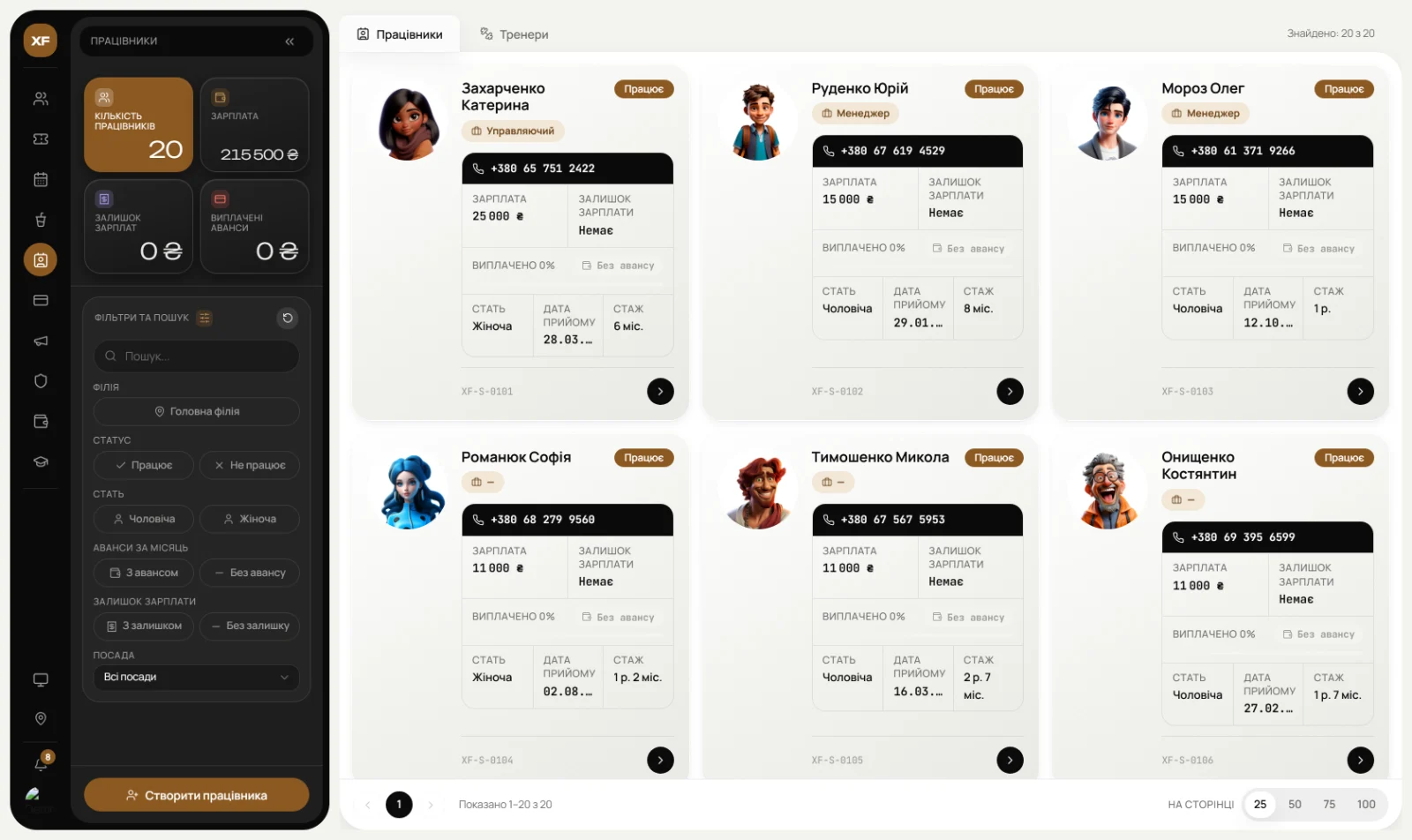
Staff module

The Staff module is the club’s personnel with roles and access: administrators, trainers, bartenders, managers. Each gets a shift schedule, salary, hourly rate and a commission on membership or product sales.

Payroll is calculated automatically from completed sessions, worked shifts and sales assigned to the employee at the cash desk. No disputes at the end of the month: the owner and the trainer see the same numbers. Every action in the system — a sale, a discount, a price change — is logged to a specific person.

xfitness.erp / staff
Screen: Staff module — Main program
06 / 07

Finance module

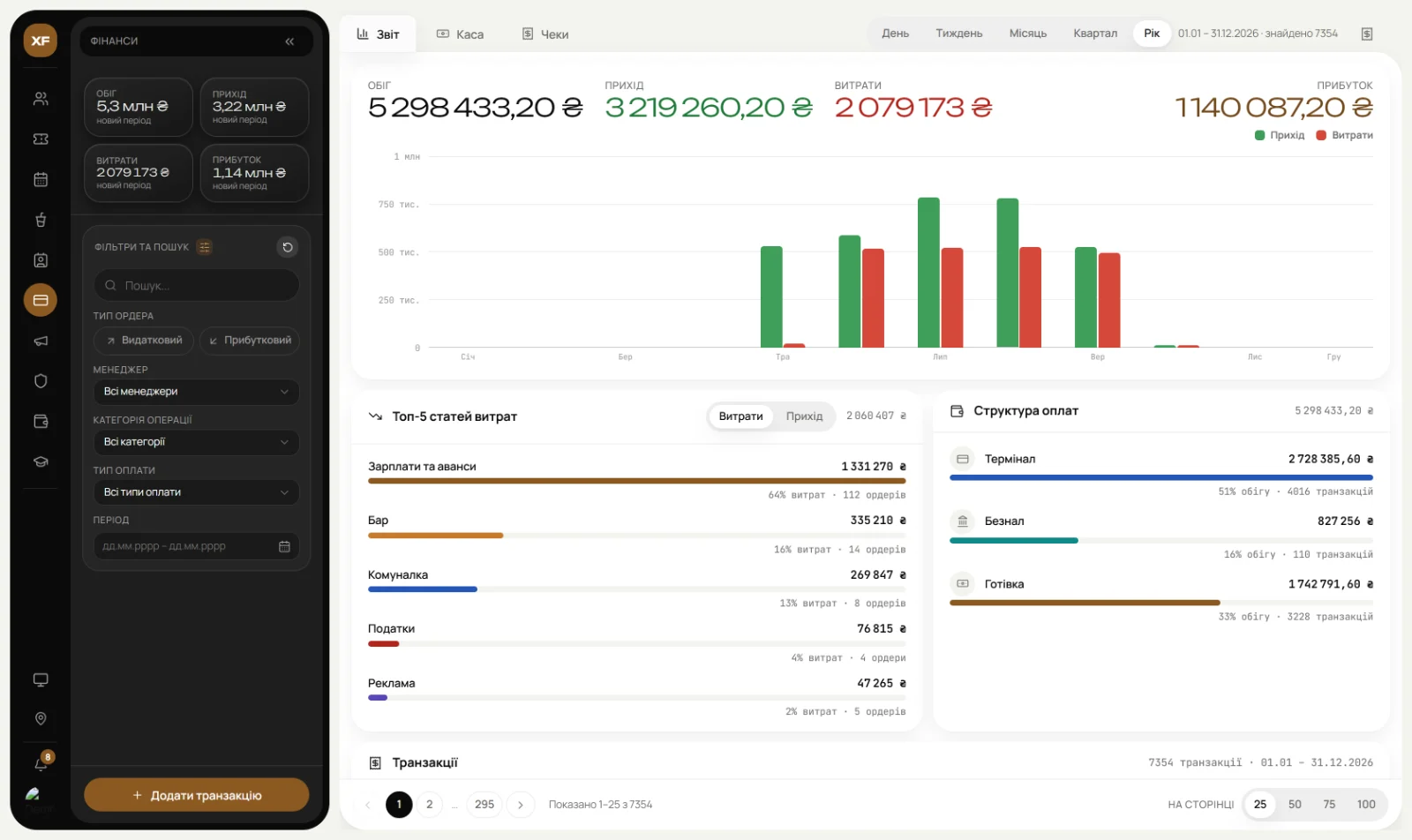
The Finance module is the log of all the club’s money: front-desk and bar receipts, membership sales, deposit top-ups, room rental, advertising spend and payroll. Cash and card separately, with filters by date, cashier, category and payment type.

The summary shows the number of receipts, revenue net of refunds and the average receipt against the previous period, so the owner sees the trend, not just the total. Everything exports to CSV for the accountant. Every transaction is tied to an employee, so it is always known who took the payment.

xfitness.erp / finance
Screen: Finance module — Main program
07 / 07

Marketing module

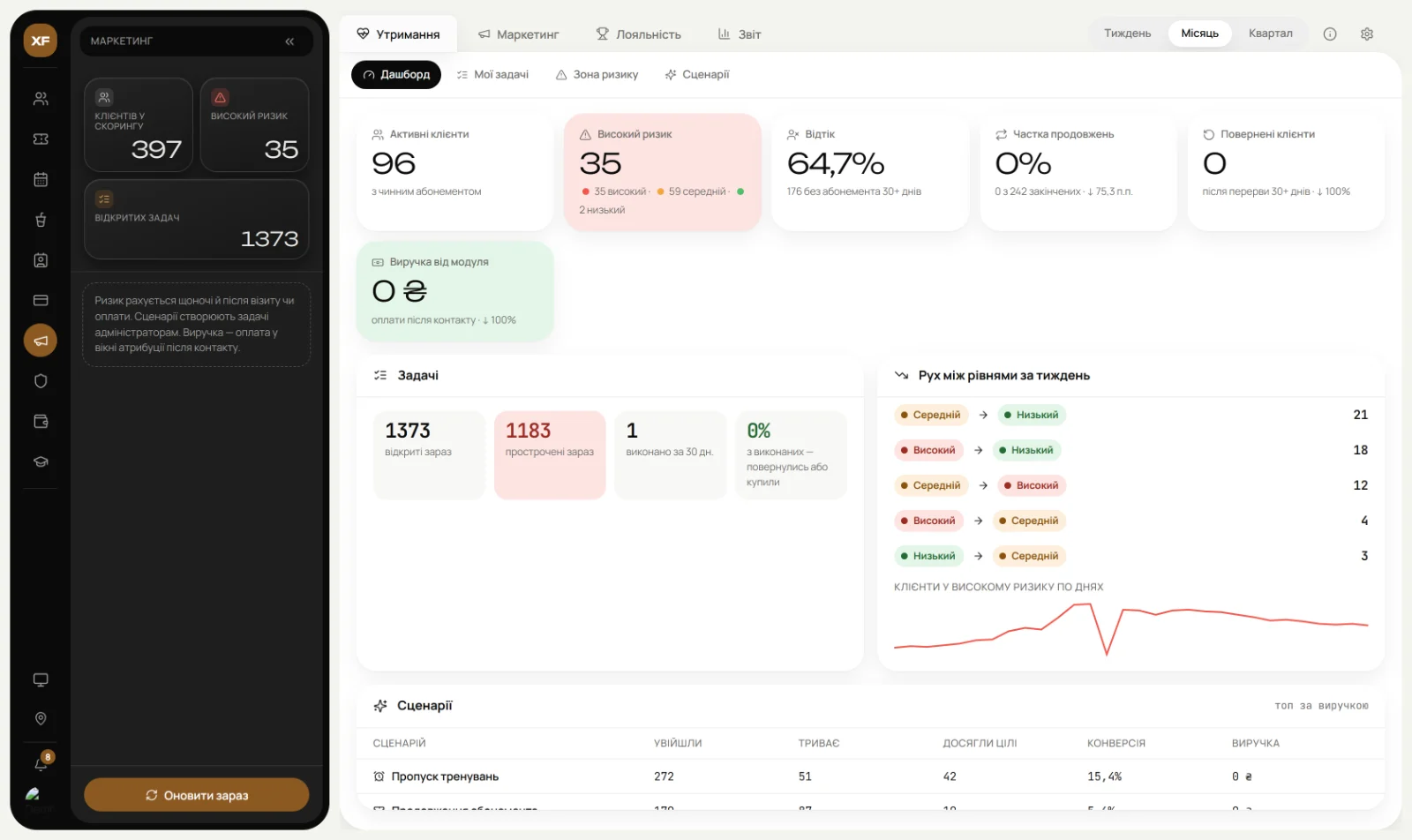
The Marketing module helps keep members, not only attract new ones. The system scores churn risk by visit frequency and membership status and assigns tasks to administrators: whom to call, whom to offer a renewal or a different membership.

Retention scenarios — a reminder that a membership is ending, winning back those who have not come for a month, a bonus for a referred friend — run automatically through app notifications. Each scenario shows revenue after contact: how many members came back and how much money it brought.

xfitness.erp / marketing
Screen: Marketing module — Main program
Part 03 · Work zone

XFitness Work zone

A tablet app for the front desk and bar: sales, cash desk, member access, memberships and stocktakes — all in sync with the main program.

The Work zone is the front-desk and bar software for a fitness club, running on a tablet or a touch terminal. The administrator checks visits in, sells memberships and products, takes payment by cash, card or from the member’s deposit, prints receipts and runs the cash shift. Everything syncs with the main program, so the owner sees sales the moment they happen.

The program keeps working without internet: sales and visits are stored locally and sent to the server as soon as the connection is back. The front desk does not stop because of a provider outage.

01 / 08

Bar module

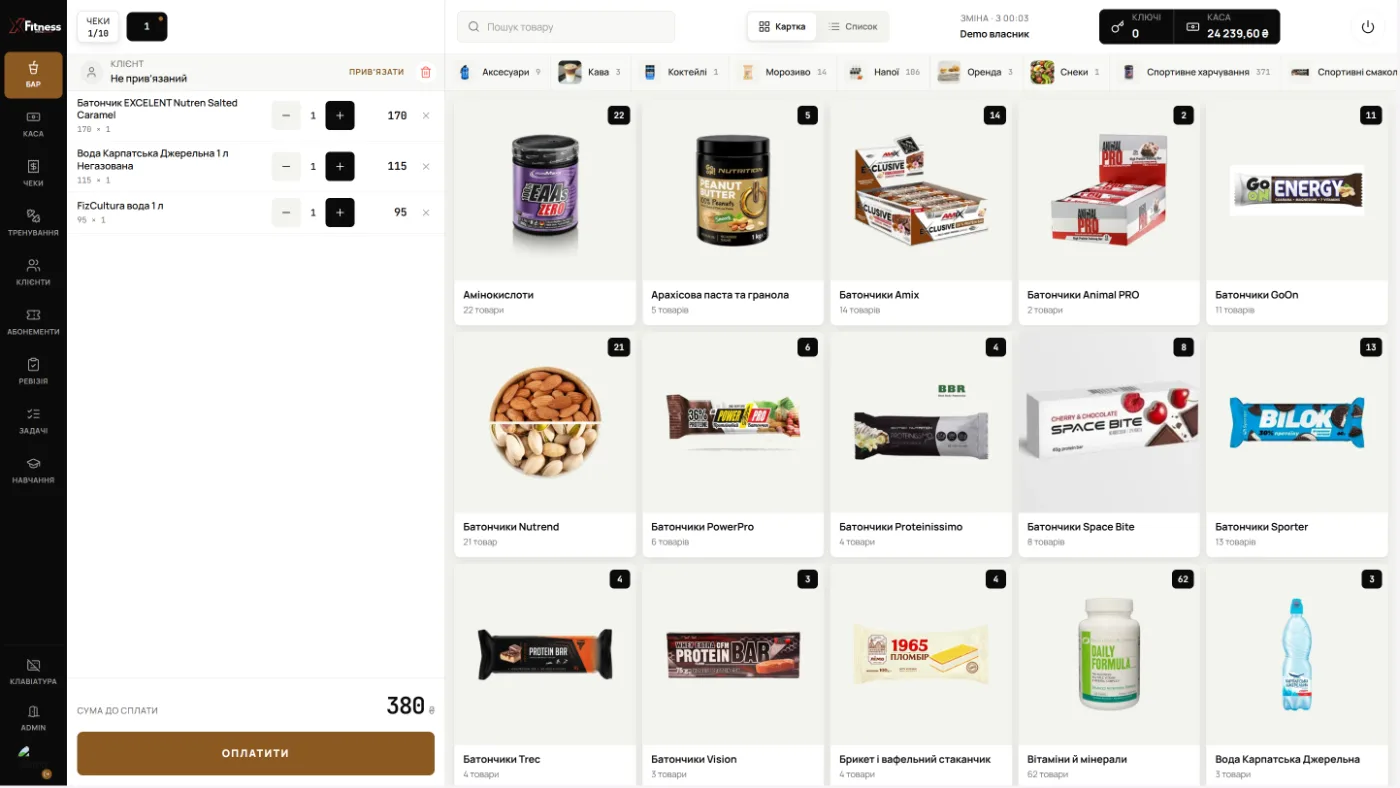
The bar in the Work zone is a cash register for selling products in one tap: categories with pictures, search, up to 15 open receipts at once to serve several members in parallel. A receipt can be linked to a member, and the purchase lands in their history and deposit.

Cocktails and dishes get a recipe in the main program — a sale writes off the ingredients from stock, not the product itself. Stock updates in real time, so the bartender sees what has run out and the owner sees what sells best.

Screen: Bar module — XFitness Work zone
02 / 08

Payment

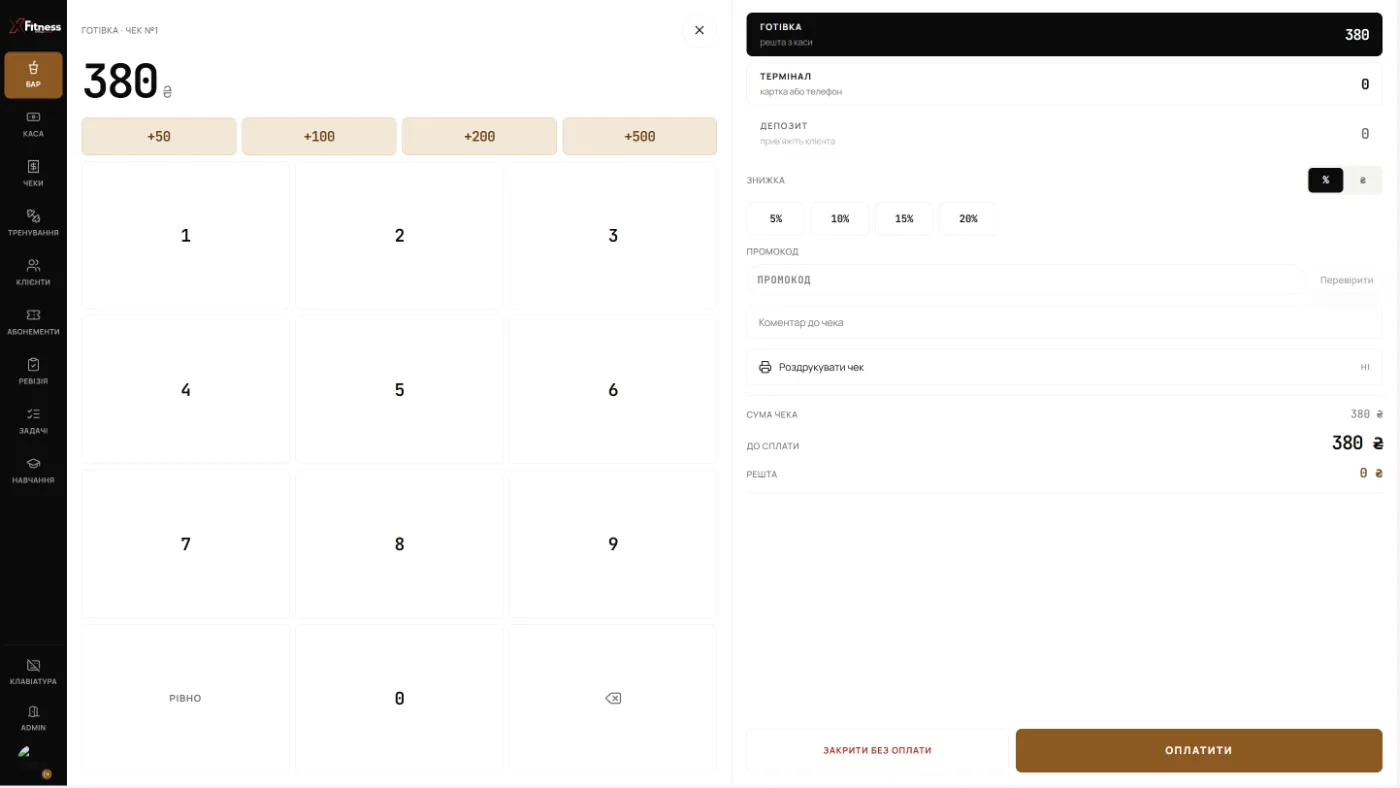
The payment screen takes cash, a terminal or the member’s deposit — and splits the amount between them when the member pays partly by card, partly in cash. A discount is set in percent or hryvnias, a promo code is checked instantly, and a comment to the receipt stays in the history.

For cash the register calculates the change, for the terminal it waits for confirmation, for the deposit it shows the member’s balance. After payment the receipt prints on the printer if the member asks for it and appears in the main program’s finance within a second.

Screen: Payment — XFitness Work zone
03 / 08

Cash desk module

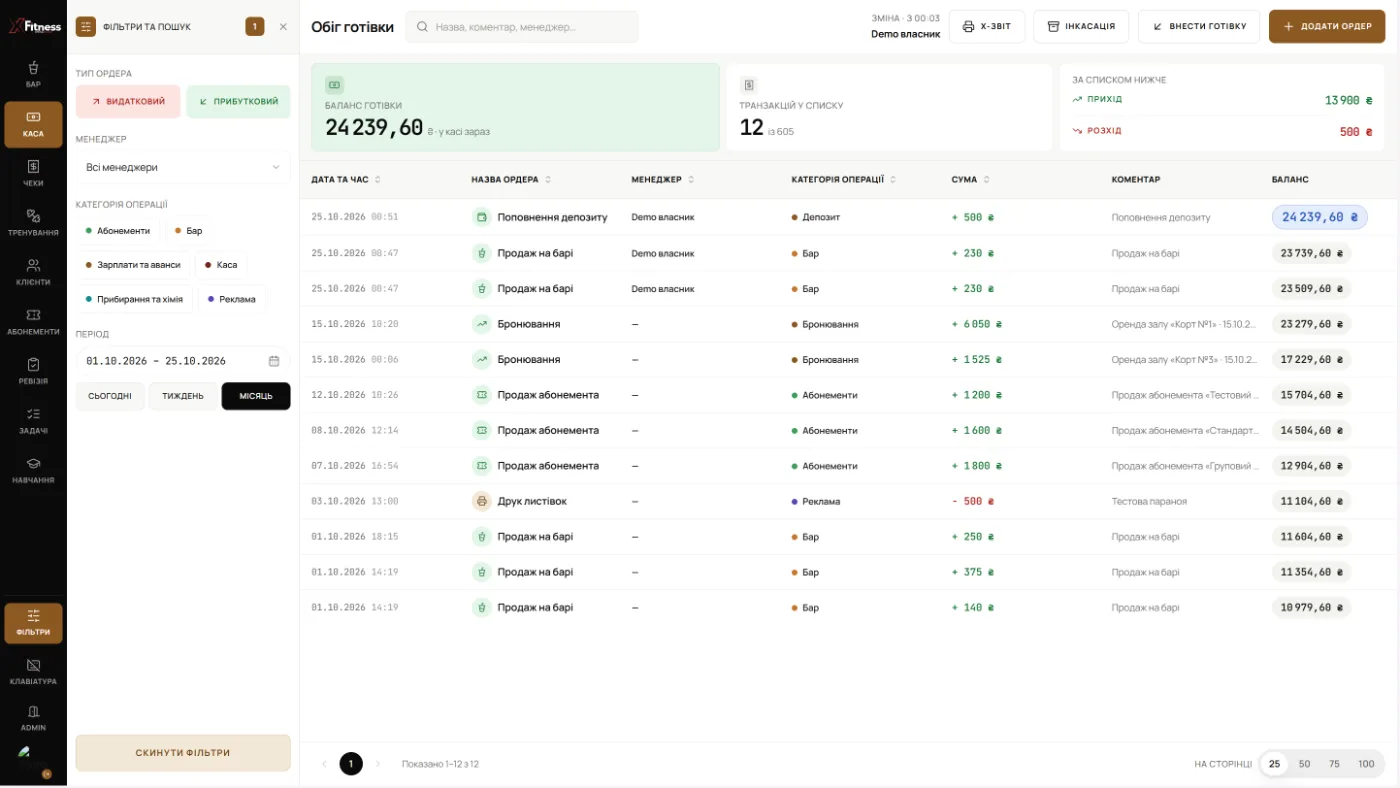
The Cash desk module is the cash flow at the front desk: the balance in the drawer right now, cash-in and cash-out orders, collection, adding change. Every order has a category — memberships, bar, payroll, cleaning, advertising — and a comment, so it is clear where the money went.

An X-report prints at any point of the shift, and every cash movement syncs instantly with the main program’s Finance module. The owner sees the drawer balance from a phone without coming to the club and spots discrepancies the same day.

Screen: Cash desk module — XFitness Work zone
04 / 08

Receipts module

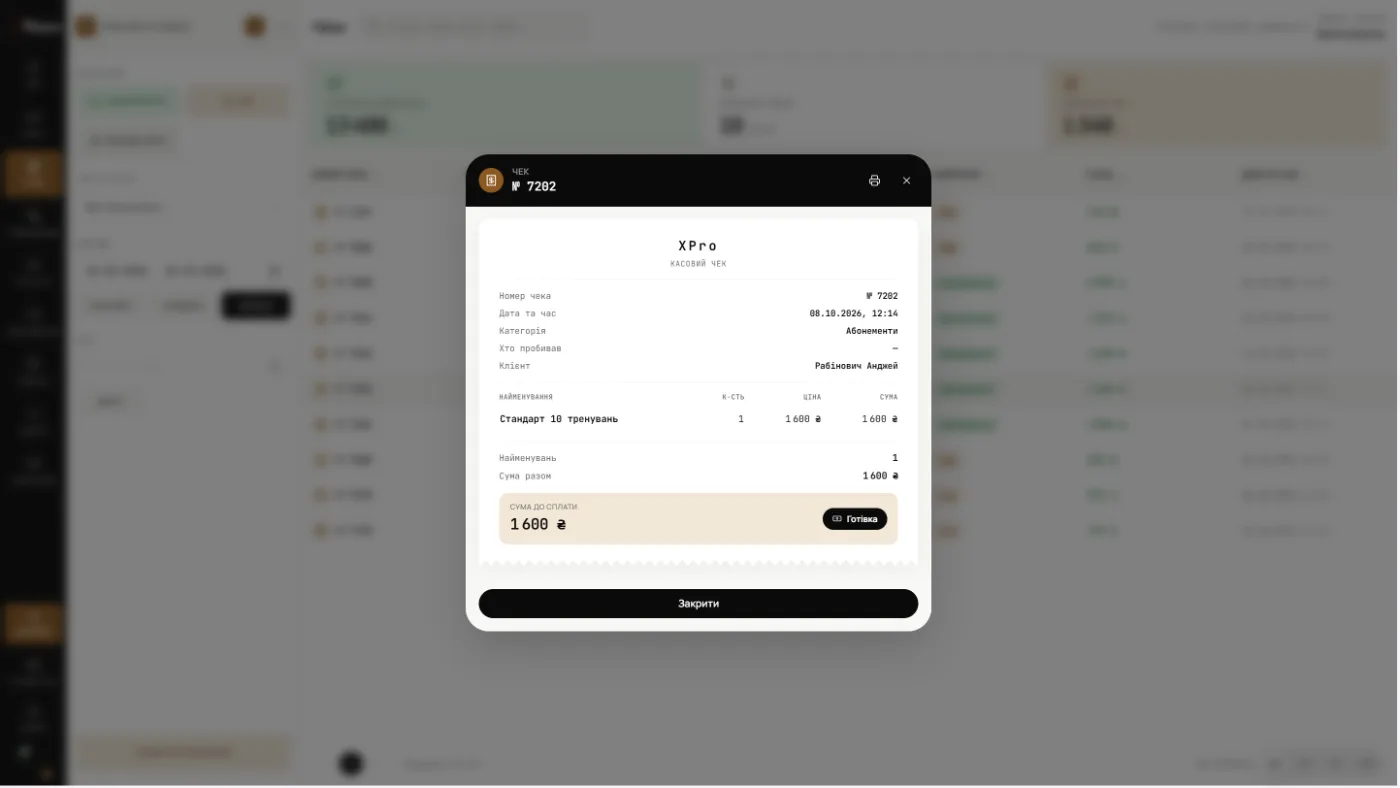
The Receipts module is every sale for the period on one screen: receipt number, number of items, payment type, who rang it up, category, amount, date and time. Filters by category, payment type, manager and period find any receipt in seconds.

The summary shows the number of receipts, the amount net of refunds and the average receipt, plus the change against the previous period. A receipt can be opened, refunded or reprinted. It is the same data as in the main program’s finance, just in a form convenient for the front desk.

Screen: Receipts module — XFitness Work zone
05 / 08

Training module

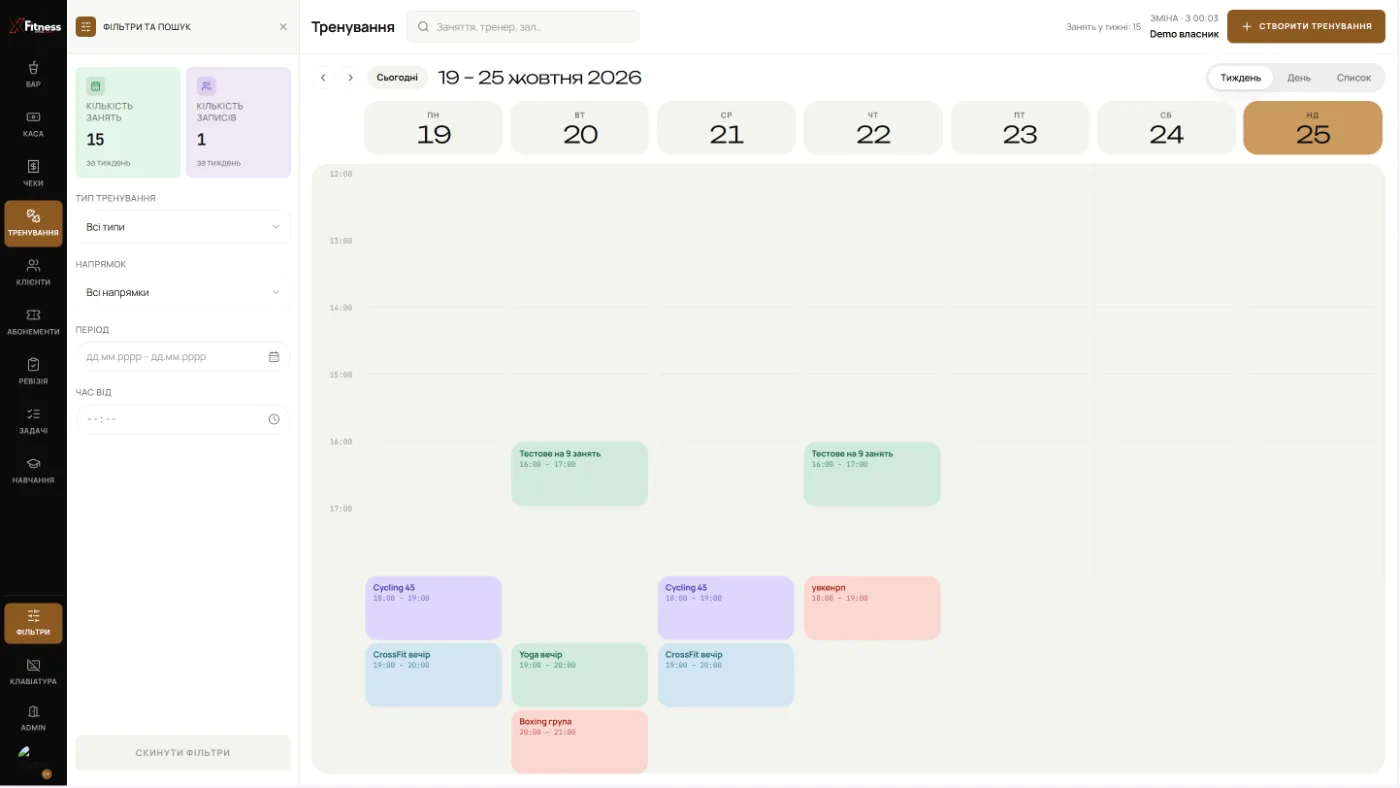
The training schedule on the front-desk tablet: sessions for the week or the day across rooms and trainers, with the number of booked and free spots. The administrator books a member for a session right at the desk when they walk up.

A new session is created right here — type, trainer, room, time, number of spots — and appears instantly in the client app and in the trainer app. Every completed session goes to the main program, where the trainer’s pay is calculated from it.

Screen: Training module — XFitness Work zone
06 / 08

Clients module

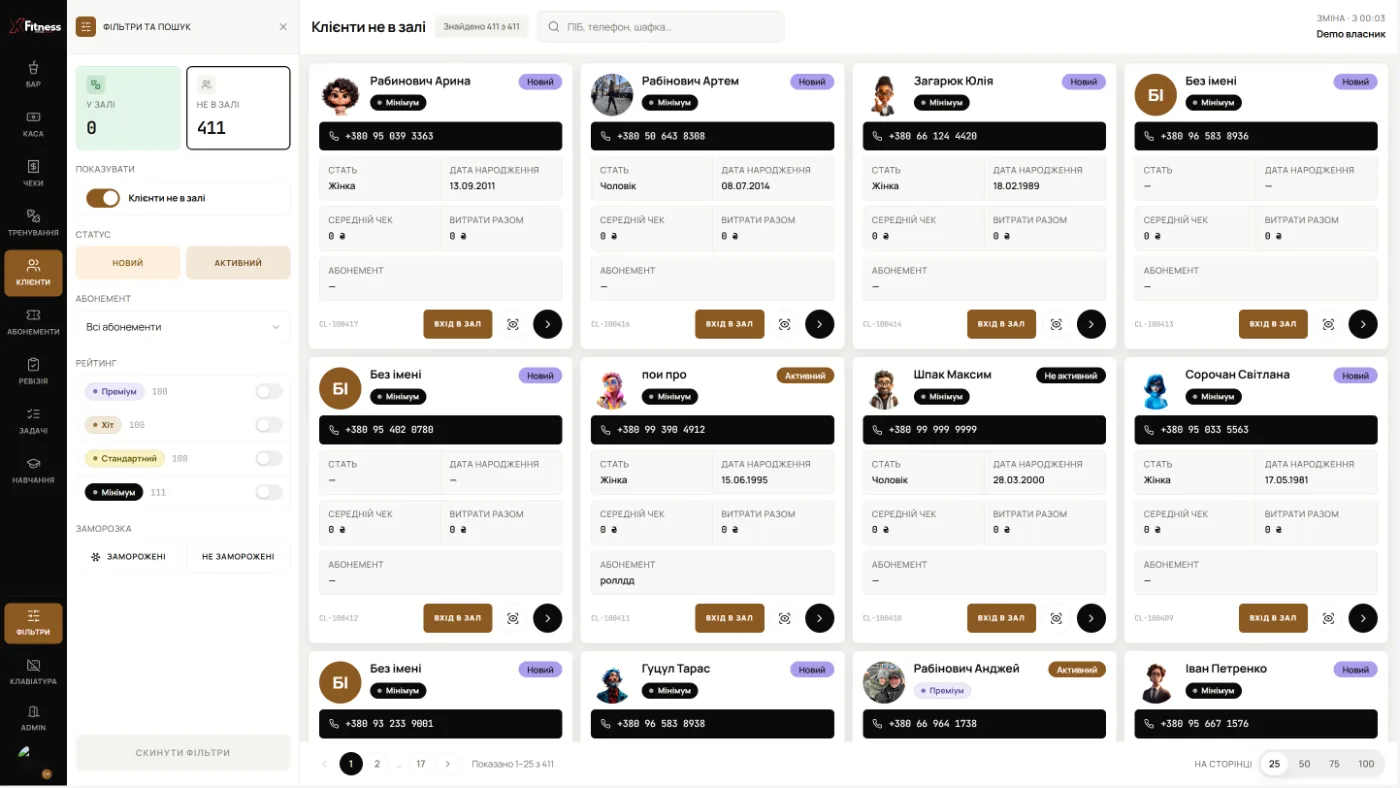
The Clients module in the Work zone shows who is in the gym right now and who has just left, and lets you manage access in real time: check an entry in by card or code, let a member without a membership in for a single visit, block access for a debtor.

The member card at the front desk is shorter than in the main program but holds the essentials: the current membership and sessions left, deposit, debt, last visit. The administrator creates a new member in a minute — name and phone — and sells them a membership right away.

Screen: Clients module — XFitness Work zone
07 / 08

Memberships module

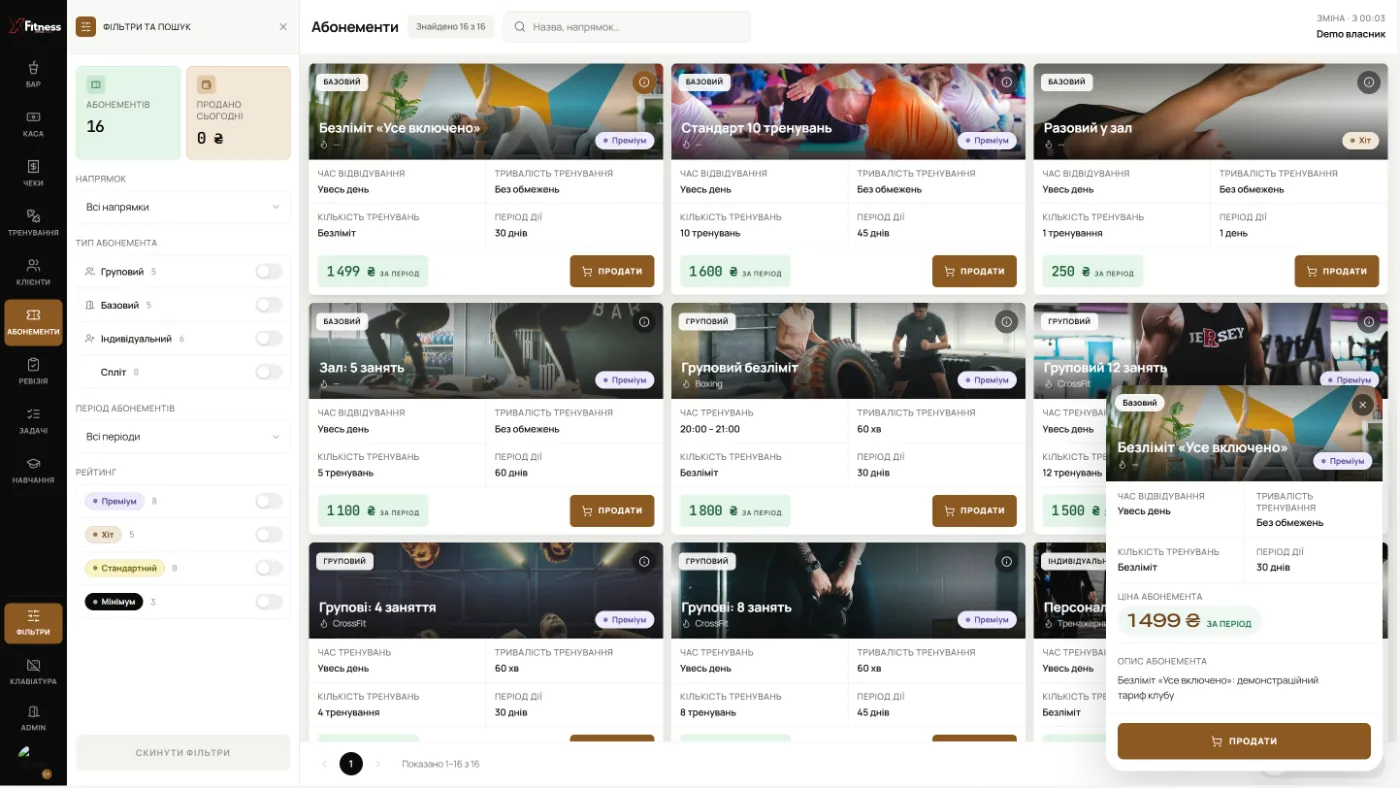
Membership sales at the front desk: the club’s catalogue with filters by discipline, type, period and rating — the same memberships and prices set in the main program. The membership card shows visiting hours, session length, number of sessions and validity.

One screen covers the whole “new member walks in” scenario: registration, membership choice, payment and access activation. The member leaves the desk with a working QR code in the app, and the sale is already in finance and in membership analytics.

Screen: Memberships module — XFitness Work zone
08 / 08

Shift

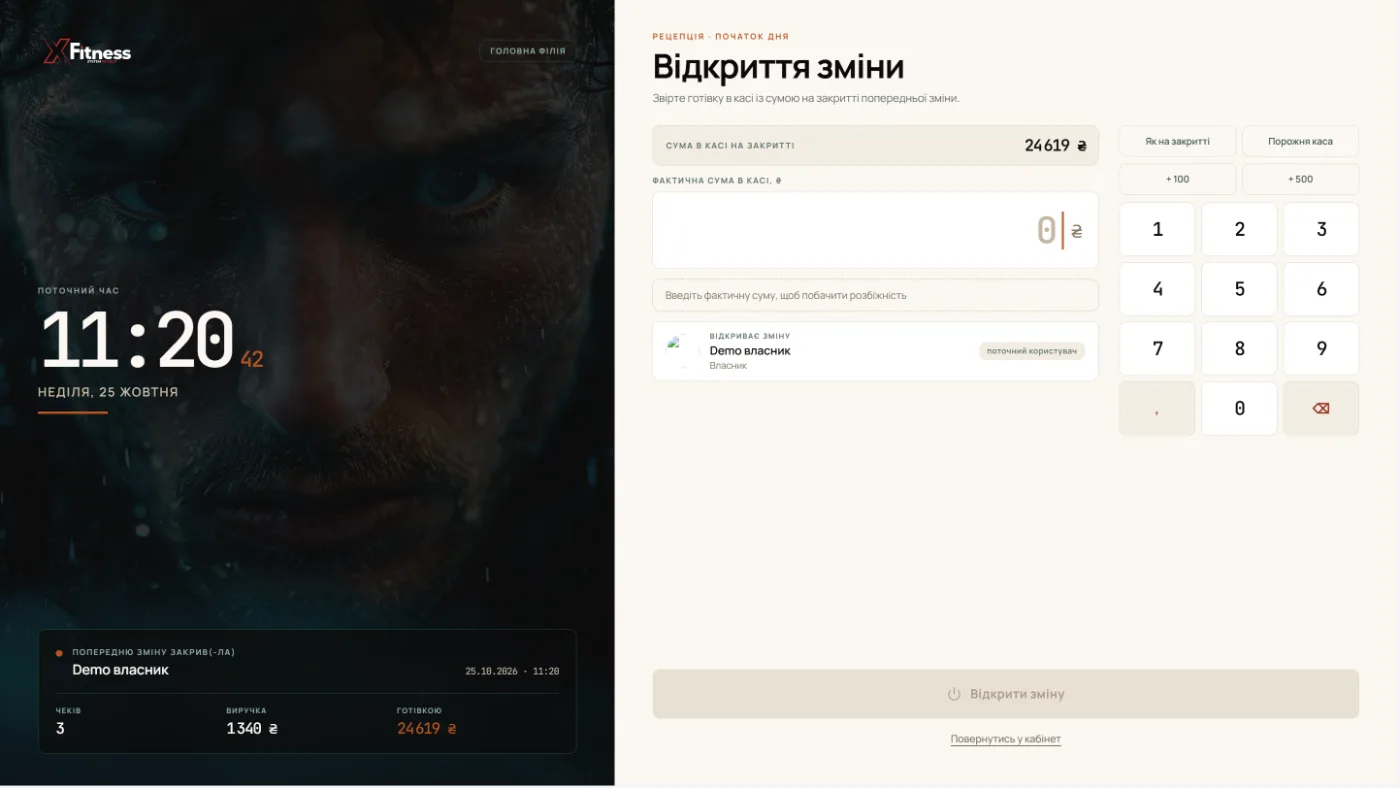
Opening a shift is the first screen of the day at the front desk: the system shows the cash at the close of the previous shift, the administrator enters the actual cash, and any discrepancy is visible immediately, not at the end of the month. Who opened the shift is recorded automatically.

Closing a shift reconciles the drawer the same way and produces a report: receipts, revenue, cash, terminal. Shifts are tied to employees, so the owner sees each administrator’s result separately, and shift pay is calculated without manual timesheets.

Screen: Shift — XFitness Work zone
Part 04 · Trainer app

App for the trainer

Schedule, bookings, chat and member cards — in one app.

The trainer app is a separate mobile app for the gym’s staff: the trainer’s own schedule of sessions and shifts, a list of members with their memberships, attendance marking and chat with members without third-party messengers. The trainer sees who is booked for a session and can reschedule or cancel it from the phone.

Completed sessions go to the main program automatically — the trainer’s pay and the member’s attendance statistics are calculated from them.

01 / 06

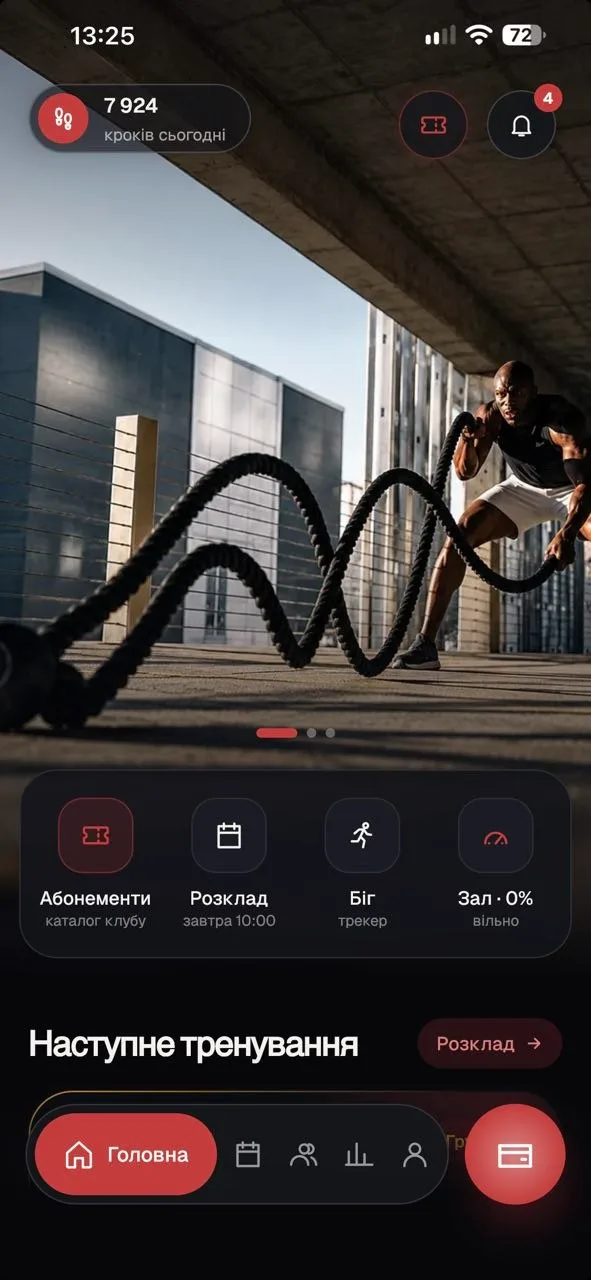
App for the trainer

A separate mobile app for the club’s trainers: the home screen shows the next sessions, the number of booked members, unread messages and quick actions. The trainer sees their working day without calling the front desk.

All data syncs with the main program in real time: a new session in the club’s schedule, a booking from the client app or a membership change appears for the trainer instantly. And the sessions they run go into the payroll calculation.

Screen: App for the trainer — App for the trainer
02 / 06

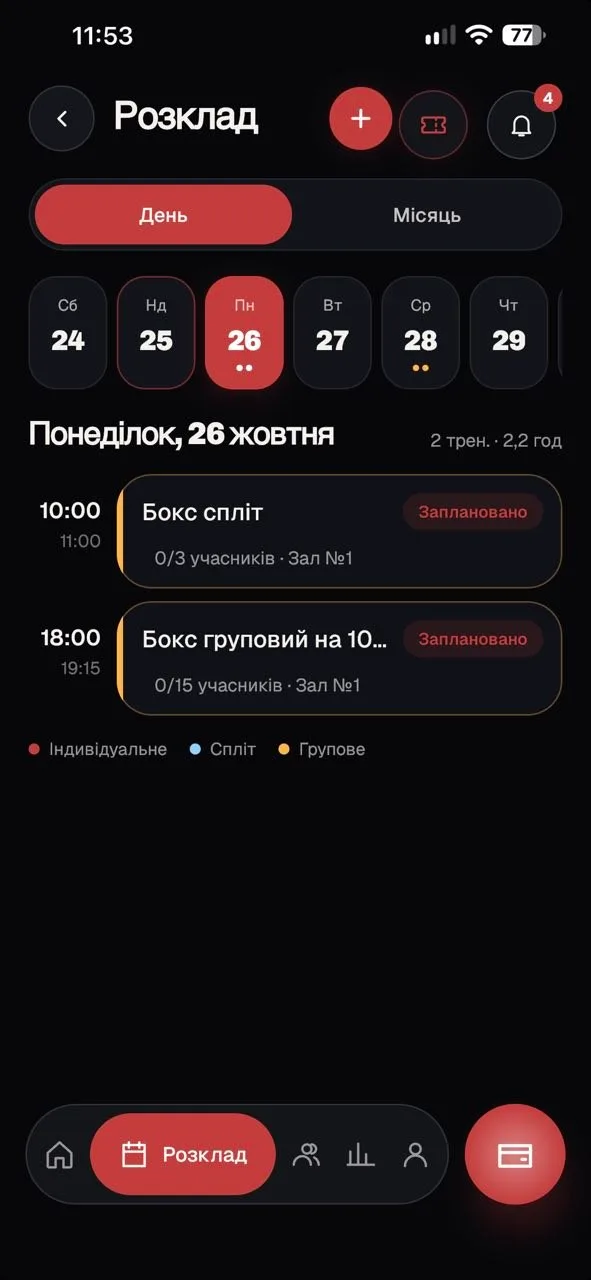
Trainer’s schedule

The trainer’s schedule by day and month: group classes, personal sessions and splits with time, room and number of participants. Colour marks distinguish the session type, and the status shows what is planned, completed or cancelled.

The trainer adds a session themselves — within the shift schedule set in the main program — reschedules or cancels it, and members get a notification in the app. The club sees every change in the overall schedule.

Screen: Trainer’s schedule — App for the trainer
03 / 06

Client bookings

Client bookings for a session: who signed up, how many spots are left, whether the member has a valid membership. Before the session the trainer sees the group, instead of counting people at the door.

Attendance is marked with one tap during the session. That mark is what the system uses to deduct the visit from the member’s membership, count the completed session for the trainer’s pay and build attendance analytics — no paper logs and no messages to the administrator.

Screen: Client bookings — App for the trainer
04 / 06

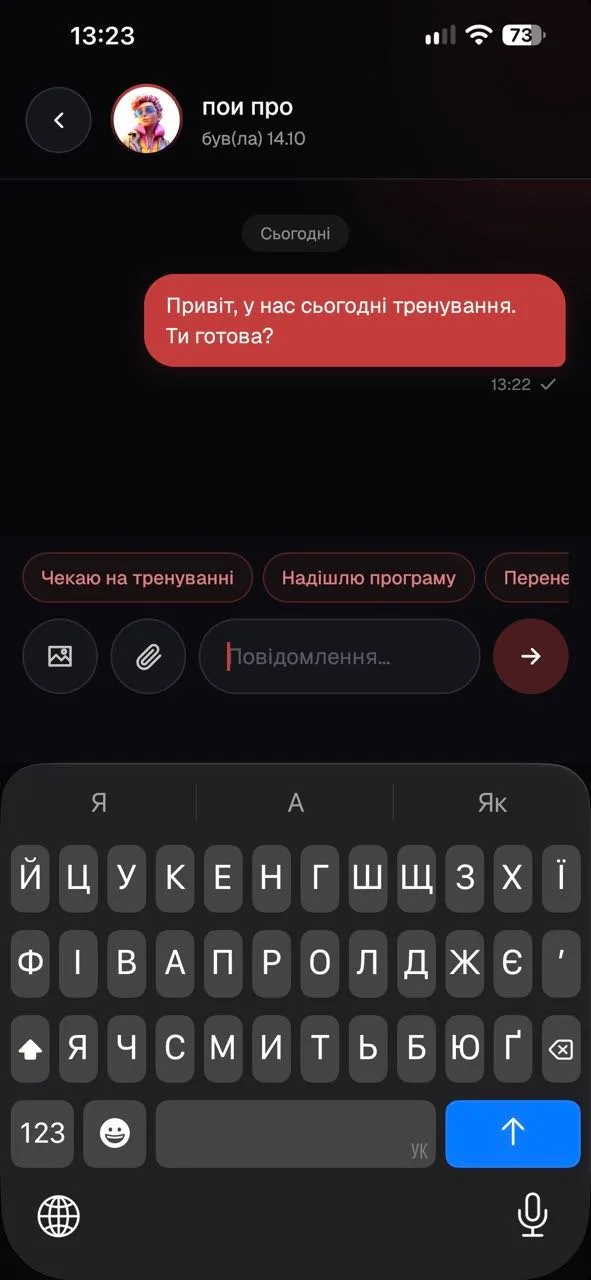
Chat with the member

Chat with the member right in the trainer app: remind about a session, reschedule, send a programme or a technique photo. Quick replies — “Waiting at the session”, “Will send the programme”, “Let’s reschedule” — save time between classes.

Conversations do not scatter across Viber and Telegram and are not lost when the trainer changes phones: the history is stored in the club’s system. The member writes from the client app, and both sides see when a message has been read.

Screen: Chat with the member — App for the trainer
05 / 06

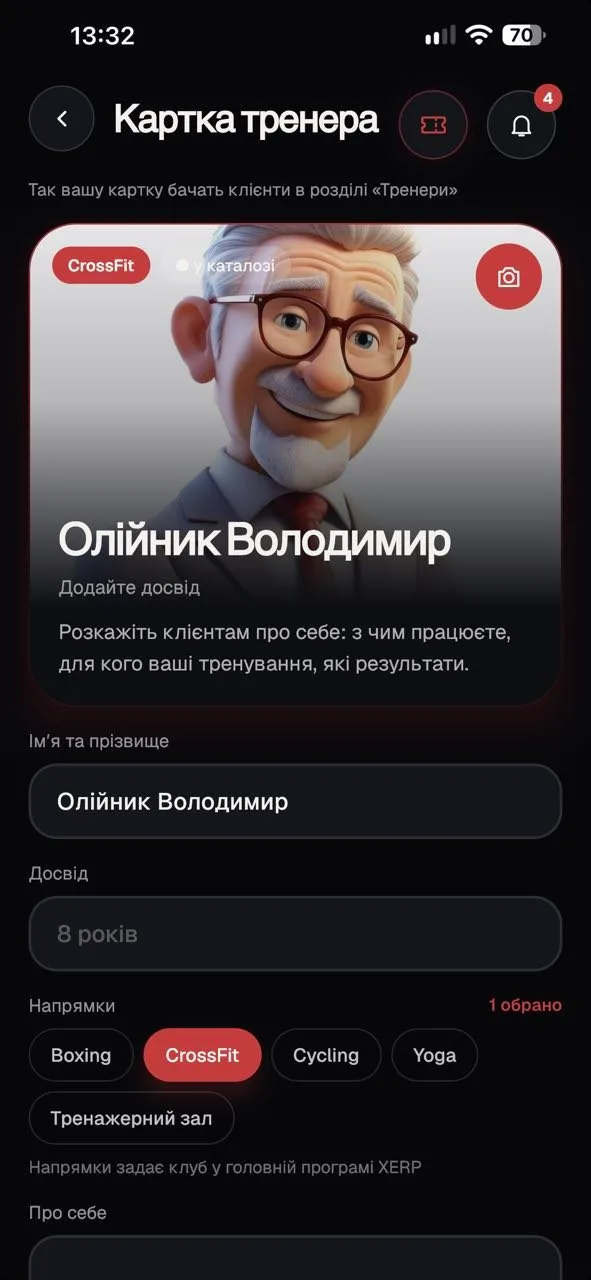
Trainer card

The trainer card is the profile members see in the Trainers section of the client app: photo, name, experience, disciplines and a few words about themselves. The trainer fills it in from their own app and sees how it will look to members.

Disciplines — boxing, CrossFit, cycling, yoga, gym — are set by the club in the main program, so every trainer’s card has the same structure and a member easily finds the right specialist with a filter. The fuller the card, the more personal-training bookings.

Screen: Trainer card — App for the trainer
06 / 06

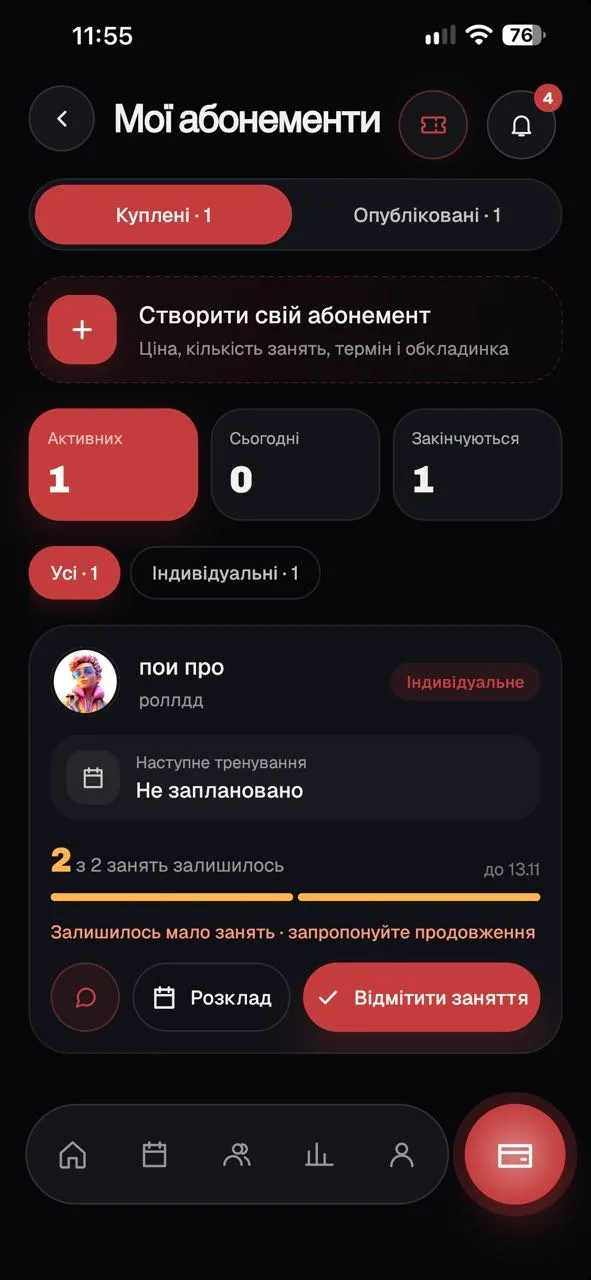
Trainer’s memberships

Personal-training memberships with the trainer: which members bought them, how many sessions are left and until when they are valid. When only a few sessions remain, the app prompts the trainer to offer a renewal — before the member drifts away.

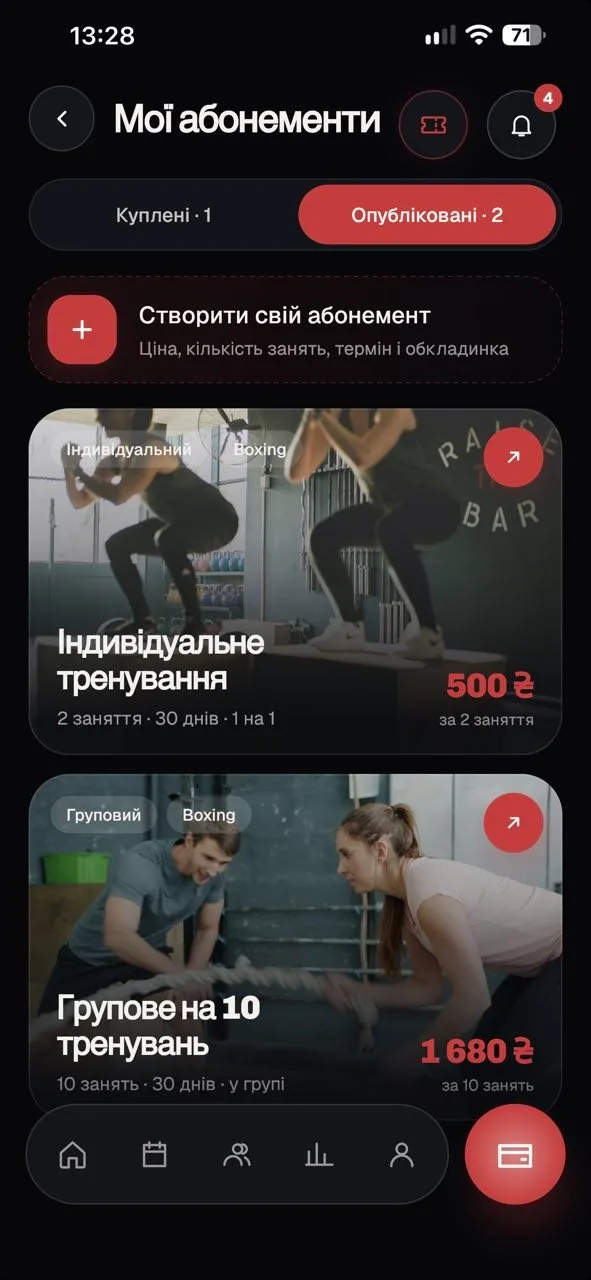
The trainer can create their own membership — price, number of sessions, validity and cover — and publish it in the client app within the club’s rules. Sales of such memberships go through the club’s cash desk, and the trainer’s commission is calculated automatically in the Staff module.

Screen: Trainer’s memberships — App for the trainer
Part 05 · Equipment

Equipment for rent

XFitness devices for the front desk, cash desk and gym entry. Paid monthly; maintenance and replacement in case of failure are included.

Bundle · 4 devices

The whole front desk under one contract.

All front-desk equipment under one contract. The devices are set up to work together and with the Work zone; we deliver and connect everything at once.

What for

For a club that is opening or refreshing its front desk: one invoice instead of four, and every device works together from day one. ₴270 a month cheaper.

How it works
01We deliver all four devices
02We connect and set them up with the Work zone
03We maintain them and replace a device if it fails
What is included
POS terminal · ₴960
Bluetooth unit · ₴290
Scanner · ₴190
Receipt printer · ₴300
Turnkey front deskMaintenance and replacement included
1 470 ₴/ month
Rent the bundle

Rent is paid monthly by bank transfer. Prices are per device per month.

Tariff plans

Choose a plan

Three XFitness ERP plans: from a single-room studio to a chain of clubs. Billed per 30 days. Pay early and no days are lost — the new period starts after the paid one. Switching plans takes effect from the next period.

01

Starter

A single-room studio that is just starting

1 380 ₴/ 30 days
9 of 15 modules60%
Custom development
Memberships
Clients
Schedule
Staff
Bar
Finance
Marketing
Client deposits
Access and usersCore
Work zone
Shift and cash desk
Client appCore
Notifications
TrainingCore
02

Pro

Popular

A full club: bar, cash desk, marketing and deposits

2 060 ₴/ 30 days
14 of 15 modules93%
Custom development
Memberships
Clients
Schedule
Staff
Bar
Finance
Marketing
Client deposits
Access and usersCore
Work zone
Shift and cash desk
Client appCore
Notifications
TrainingCore
03

Enterprise

A chain of clubs and custom development for your processes

20 000 ₴/ 30 days
15 of 15 modules100%
Custom development
Memberships
Clients
Schedule
Staff
Bar
Finance
Marketing
Client deposits
Access and usersCore
Work zone
Shift and cash desk
Client appCore
Notifications
TrainingCore
In every planUnlimited

number of staff and system users

In every planReal time

every change is instantly visible in all apps

In every planOwn data center

hosting, backups and monitoring included

In every planSupport

onboarding, staff training, SLA

FAQ

Questions clubs ask before signing up

Does XFitness suit a small single-room studio?

Yes, that is what the Starter plan is for — ₴1,380 per 30 days: members, memberships, schedule, staff and finance with no limit on the number of members. The bar, cash desk and marketing come with the Pro plan when the club grows.

Do we have to buy equipment?

No. The main program runs in a browser and the Work zone on any tablet. The POS terminal, scanner, Bluetooth unit and receipt printer can be rented monthly with maintenance and replacement in case of failure.

How do members enter the gym?

With a QR code from the mobile app, with a card via the scanner or automatically through a Bluetooth unit by the door. Every entry is recorded, the visit is deducted from the membership and the administrator sees who is in the gym right now.

What happens if the internet goes down?

The Work zone on the POS terminal works locally: it checks visits in, sells memberships and products and runs the shift. When the connection is back, the data syncs with the main program on its own.

Can we migrate members from an old program or Excel?

Yes, migrating the member base and active memberships is part of onboarding. Launch usually takes one to three weeks, including training for administrators and trainers.

Will the mobile app carry our club’s name?

Yes. The client app is branded for the club — name, logo, colours, photos of the gym — and published on the App Store and Google Play as your club’s own app.

Where is the data stored and who owns it?

In XPro’s own data center in Chernivtsi, Ukraine, with daily backups and monitoring. The data belongs to the club: export of members, memberships and finance is available at any time.

About the system

Gym management software: what the system must do and what you pay for

A club with two hundred members can still be run from a notebook and Excel. With five hundred it cannot: memberships expire unnoticed, the cash drawer does not add up, trainers argue about pay, and the owner learns about revenue problems at the end of the month. Gym management software closes exactly this gap — it keeps members, memberships, money and staff in one database and shows the club in numbers every day, not once a month.

What sets XFitness ERP apart from a typical fitness club CRM

  • Four apps on one databaseThe owner’s main program, the front-desk tablet, the client app and the trainer app read and write the same data. A sale at the front desk shows in finance within a second, and a QR entry in the member’s analytics.
  • The front desk works offlineThe Work zone on the terminal stores sales and visits locally and sends them to the server once the connection is back. A provider outage does not stop the club.
  • Own data center and support in the priceHosting, backups, monitoring, onboarding and staff training are part of the plan. You do not look for separate hosting and do not pay per “hour of setup”.
  • The developer is next doorXFitness ERP is built and supported by the XPro studio in Chernivtsi, Ukraine. Custom development for your processes comes with the Enterprise plan, not a queue at a foreign vendor.

Who the system is for

Gyms and fitness studios with one room, martial arts sections and dance schools, clubs with a bar and sports nutrition, chains with several locations. The Starter plan is sized for a studio that has just opened; Pro for a full club with a bar, cash desk and marketing; Enterprise for a chain and custom development. If you are not sure which plan you need, request a demo — we will show the system on your own memberships.

Membership and member records

Every member has a digital card: contacts, status, purchased memberships, sessions left, visit and purchase history, average receipt. Memberships can be per number of sessions, per period or unlimited, with restrictions by time of day and discipline. The system reminds the member in the app when a membership is about to expire and shows the administrator who is worth winning back — the Marketing module scores churn risk by visit frequency.

Cash desk, bar and finance

Sales of memberships, bar products and single visits go through the Work zone with a printed receipt; payment by cash, terminal or the member’s deposit. The cash shift opens with the drawer balance and is reconciled with the previous one. The bar keeps stock with cocktail recipes, invoices and stocktakes. All of it lands in the Finance module — a transaction log with filters by date, cashier and payment type, exportable to CSV for the accountant. More on our approach to financial records on the CRM systems page.

QR gym entry and equipment

A member enters the gym with a QR code from the app or with a card via the front-desk scanner; with a Bluetooth unit by the door the entry triggers itself while the phone stays in the pocket. The visit is deducted from the membership automatically and shows up in analytics right away. The equipment — POS terminal, scanner, Bluetooth unit and receipt printer — we rent out monthly with maintenance and replacement, so the club does not have to buy hardware at the start.

Onboarding and support

Launch takes one to three weeks: we migrate the member and membership base from Excel or the previous system, set up the club’s plans, train administrators and trainers. Then comes support with an SLA: updates, backups and monitoring in XPro’s own data center. The club’s data belongs to the club: export is available at any time.

What gym management software costs

XFitness ERP costs from ₴1,380 per 30 days on the Starter plan and ₴2,060 on Pro — with no limits on members, staff or system users. Hosting, backups, updates, training and support are included. The only separate charge is equipment rent, if you need it: from ₴190 a month for a scanner to ₴1,470 for a full front-desk bundle. There is no one-off onboarding fee.

Next step

We will show the system on your own processes

A 30-minute demo: we create one of your memberships, sell it through the Work zone and watch how it looks in the client app and in the finances.